Benchmarks
Lightpanda publishes three benchmarks against headless Chrome:
- Crawling at scale: following every link on a 933-page demo site.
- Single-page automation: repeated load-and-extract cycles over CDP.
- AI agent task completion: task accuracy on AssistantBench and GAIA.
Across all three, Lightpanda uses less memory and CPU than Chrome and finishes faster. Each section below states the source of its numbers. For exact commands and raw output, see Reproduce these results.
How results are measured
The crawling and single-page benchmarks track peak memory (via smem, using PSS so shared pages aren’t double-counted), CPU utilization (via ps aux), and wall-clock duration, sampled every 100ms during the run. Both run on an AWS m5.xlarge instance with a fresh Ubuntu install, comparing Lightpanda against Google Chrome 143.0.7499.169.
The AI agent benchmark grades differently: each task’s final answer is checked against a known correct answer, not a screenshot, since Lightpanda has no rendered page to screenshot in the first place.
Crawling at scale
Source: Crawler Benchmark, BENCHMARKS.md in the demo repository.
This benchmark crawls demo-browser.lightpanda.io/amiibo , a demo product catalog, following every link from the index page to its subpages: 933 URLs in total. A Go program using chromedp drives the crawl over CDP, so both browsers are exercised through the same client code.
Chrome runs one browser with multiple tabs, since that’s how most people scale automation with a normal browser. Lightpanda can’t open multiple tabs in one process, so it runs multiple processes instead, each on its own port. This mirrors how each browser is actually deployed in production, not just a same-process comparison.
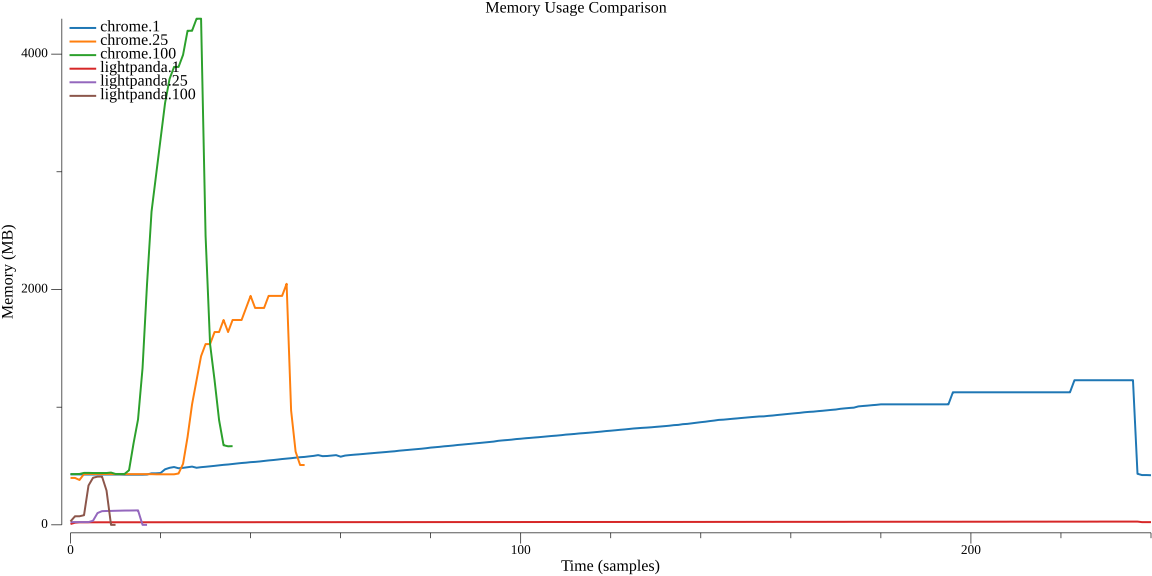
Chrome shares a lot of infrastructure (renderer processes, V8 heaps) across tabs in the same browser. Lightpanda processes are fully independent. The comparison below is tab count against process count, because that’s the unit each browser scales with.
| Parallel tabs/processes | Lightpanda duration | Lightpanda memory peak | Chrome duration | Chrome memory peak |
|---|---|---|---|---|
| 1 | 0:51.68 | 27.2M | 1:22.83 | 1.3G |
| 2 | 0:29.79 | 31.7M | 0:53.11 | 1.3G |
| 5 | 0:11.70 | 43.9M | 0:45.66 | 1.6G |
| 10 | 0:06.76 | 63.7M | 0:45.62 | 1.7G |
| 25 | 0:04.81 | 123.0M | 0:46.70 | 2.0G |
| 100 | 0:05.23 | 410.2M | 1:09.37 | 4.2G |
At 25 parallel tasks, the point where both browsers are near their best throughput, Lightpanda finishes in 4.81 seconds using 123MB, against Chrome’s 46.70 seconds and 2.0GB: about 9x faster and 16x lighter. Chrome’s duration plateaus past 5 tabs because its tabs share a process and start contending for resources. Lightpanda keeps improving up to 25 processes, since each process is fully isolated and the machine still has headroom.
Single-page automation
Source: Campfire e-commerce Benchmark, BENCHMARKS.md in the demo repository.
Crawling measures fetching and following links. This benchmark measures what happens once a script needs to load a page, wait on network requests, and read data back, the pattern behind most scraping and testing code. It uses a homemade e-commerce demo page that loads product details and reviews over two XHR requests, served from a local web server to keep network latency out of the result. A Puppeteer script connects over CDP and repeats the same load-and-extract task 100 times.
| Browser | Avg run duration | Total duration (100 runs) | Memory peak | CPU peak |
|---|---|---|---|---|
| Lightpanda | 16ms | 1,698ms | 21.2M | 4.6% |
| Chrome 143.0.7499.109 | 185ms | 18,551ms | 402.1M | 158.6% |
Lightpanda completes the same 100 runs about 11x faster, using roughly 19x less peak memory. See Architecture overview for why.
AI agent task completion
Source: agent-benchmarks , the current results and cross-framework comparison sections of its README.
Crawl and page-load benchmarks measure raw speed, but they don’t tell you whether an AI agent actually completes its task. Running lightpanda agent, the built-in agent loop with no MCP or CDP round-trip, against AssistantBench’s 33-task validation split and GAIA Level 1’s 53-task validation split, with Claude Sonnet 4.6 and a 1,800-second per-task timeout, scores 69.7% strict accuracy on AssistantBench and 83.0% on GAIA, with zero timeouts on either. Cost per task, computed from token usage: $1.94 on AssistantBench, $0.34 on GAIA.
To isolate whether that result comes from the engine or the tool surface, Lightpanda also ran the same Claude Sonnet 4.6 session over MCP against three other setups: agent-browser driving Chromium, agent-browser driving Lightpanda as its engine instead of Chrome, and browser-use driving Chromium. Only the browser and its tool surface change between rows.
| Suite | Lightpanda MCP | agent-browser + Chromium | agent-browser + Lightpanda | browser-use (Chromium) |
|---|---|---|---|---|
| AssistantBench, strict | 66.7% | 57.6% | 57.6% | 39.4% |
| GAIA Level 1, strict | 86.8% | 84.9% | 81.1% | 47.2% |
AssistantBench accuracy is identical whether agent-browser drives Chrome or Lightpanda (57.6% either way), so the gap to Lightpanda’s own MCP tool surface (66.7%) comes from the tools, not the engine underneath them. On GAIA, swapping Lightpanda in under agent-browser costs a few points of accuracy (81.1% vs 84.9%), on pages where Lightpanda’s text-only output misses content a rendered page would show.
Reproduce these results
The crawler and CDP benchmark scripts, exact commands, and raw /usr/bin/time output live in BENCHMARKS.md in the demo repository , alongside the chromedp crawler source. The AI agent benchmark’s suites, runners, and raw results live in the agent-benchmarks repository .