Architecture overview
Lightpanda is a headless browser built in Zig to be driven by machines, not viewed by people. Its defining choice is that it has no rendering engine and never draws a page to a screen.
It fetches pages through a network layer, then runs a JavaScript engine to execute their scripts against an in-memory DOM and Web APIs, but drops the graphics pipeline that makes a normal browser heavy. A single native binary exposes that engine through several entry points, from a CDP server to a built-in AI agent.
Why there’s no rendering engine
A normal browser runs a rendering pipeline to turn a page into pixels for a human: style resolution, layout, paint, and compositing. Machines rarely need those pixels. A client sends commands over a protocol (usually CDP, the Chrome DevTools Protocol) and reads the page’s structure, the DOM, back. The picture on screen is irrelevant.
Lightpanda drops the rendering pipeline. What remains is the set of components automation uses, the same ones detailed further down this page:
- Control surface. The entry points you drive it through:
fetch,serve(CDP, or WebDriver classic and BiDi),agent,mcp, and, on the cloud, the HTTP API. - Network layer. Fetches the main document and its subresources over HTTP.
- HTML parser. Turns fetched HTML into that DOM.
- JavaScript engine. Runs the page’s scripts. Lightpanda uses V8, the same engine as Chrome.
- Web APIs and the DOM. The in-memory document that scripts read and mutate.
Because Lightpanda does not render, it does not compute a real visual
layout. Element size is a fair approximation from CSS and HTML attributes,
but element position is simulated from DOM depth and sibling order, not
real layout
(calculateDocumentPosition).
Page.captureScreenshot returns a placeholder image, not a real render.
Reach for a full browser when you need actual pixels.
How the parts fit together
Lightpanda ships as a single native binary. At runtime it has one process. That process holds state shared across the whole run (the App) and creates browser instances on demand. Each browser instance owns one V8 isolate and the page hierarchy that runs inside it.
The stack, top to bottom:
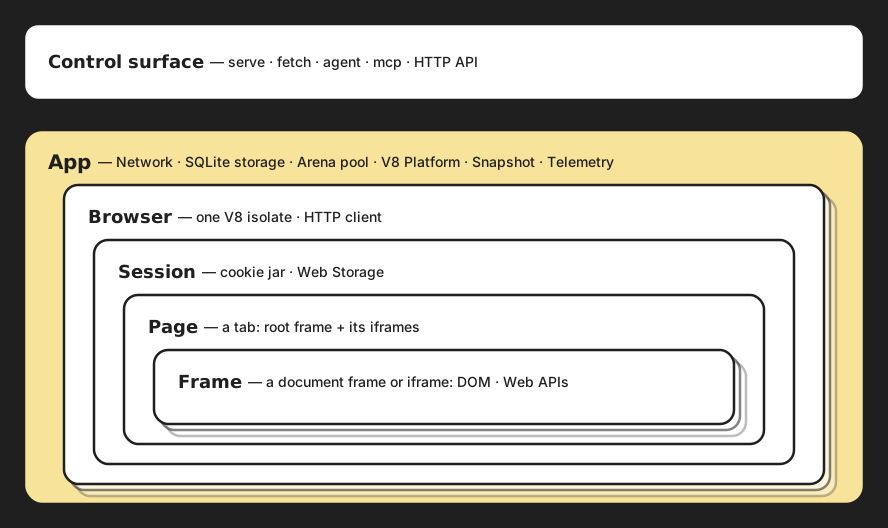
Every box in the diagram maps to a directory in the browser repository :
| Path | Where it sits in the diagram |
|---|---|
src/cdp/, src/agent/, src/mcp/ | Control surface |
src/main.zig, src/App.zig | App and its process-wide services |
src/network/ | The App’s network layer (libcurl, robots.txt, WebSocket) |
src/browser/ | Browser, Session, Page, Frame |
Entry points
The same engine runs behind these entry points. Each is a different way to drive it, and each has different availability across local and cloud:
fetchloads one or more URLs and dumps the result to stdout as HTML or Markdown. It is a one-shot command with no server.servestarts a CDP server on port9222by default. Clients like Puppeteer, Playwright, and chromedp connect over the Chrome DevTools Protocol. This is the mode most automation uses. Pass--protocol webdriverto speak WebDriver BiDi instead.agentstarts an interactive AI agent that browses the web from natural language and can record reproducible scripts.mcpstarts a Model Context Protocol server over stdio, so an LLM host can use the browser as a tool.- The HTTP API is a
POST /api/fetchendpoint that returns a page’s HTML or Markdown from a single request, no CDP script needed. It is the cloud’s equivalent of the localfetchcommand.
The agent-oriented modes stack the same engine under different amounts of the browser. With serve, your client drives the engine over CDP. With mcp, the binary also carries the tool server. With agent, it carries the whole loop, so no protocol sits between the model and the engine.
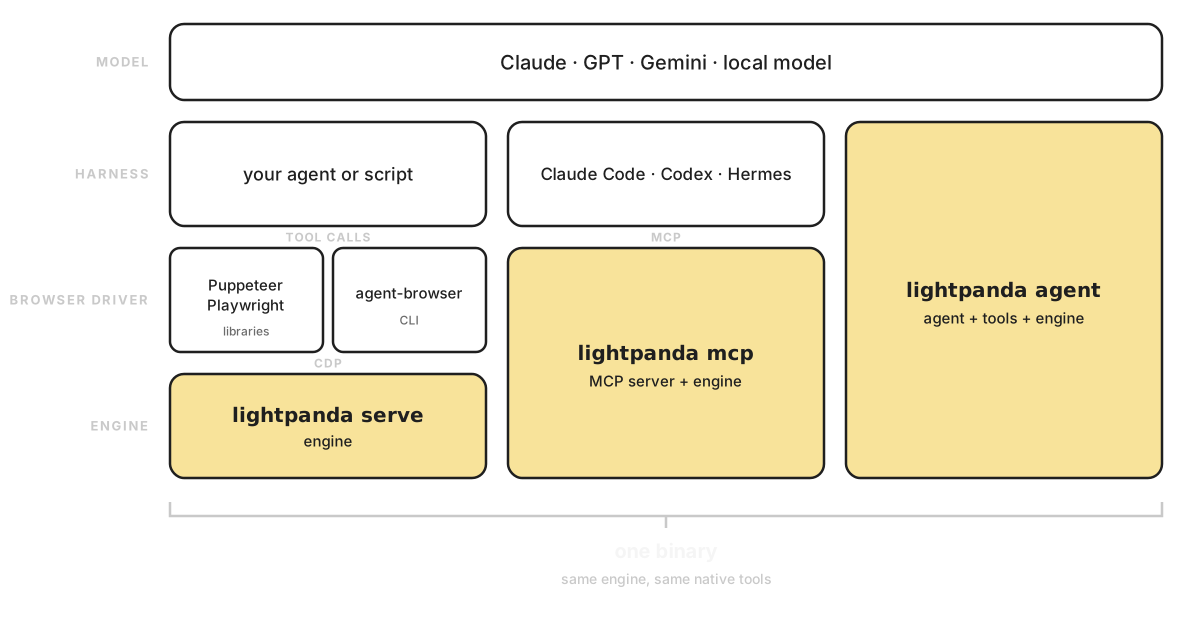
The browser engine
Below the entry points, one object hierarchy runs pages. It separates state that lives for the whole process from state scoped to a browsing session.
App is created once at startup and owns the process-wide services shown above, and everything below borrows from them. Two are worth naming: the arena pool (a shared set of memory arenas, see Memory model) and telemetry (anonymous usage metrics, off in debug builds and disabled with LIGHTPANDA_DISABLE_TELEMETRY).
- Browser wraps a single V8 isolate. An isolate has thread affinity, so a browser is created and used on one thread. It also holds a per-browser HTTP client and borrows arenas from the
Apppool. A browser contains one session. - Session is a browsing context group. It owns the cookie jar (the session’s cookie store) and Web Storage (
localStorageandsessionStorage), the state that outlives navigation. This is per-session and separate from theApp’s SQLite storage backend. - Page is the tab-level container for a frame tree: one top-level browsing context that owns the root frame and any iframes below it.
- Frame is one document frame, either the main frame or an iframe. It owns the DOM (
Document) and the Web APIs (Window) scripts run against.
Cookies and permissions belong to the session, so they survive when a page navigates. The isolate belongs to the browser, so it survives across pages but never crosses threads.
Network layer. It sits on top of libcurl , fetches the main document and subresources, manages the cookie jar, and can honor robots.txt when you pass --obey-robots.
HTML parser. Parsing is delegated to html5ever , the spec-compliant Rust parser from the Servo project. Lightpanda calls it over a C ABI from src/browser/parser/ and builds the DOM tree from the parser’s callbacks. This is why building the browser from source needs a Rust toolchain in addition to Zig.
JavaScript engine. Lightpanda runs page scripts on V8 and does not reimplement JavaScript. The Zig code in src/browser/js/ is a thin wrapper around V8’s C++ API: isolates, contexts, values, promises, and modules. The Web API objects that scripts touch are implemented in Zig, so document, window, and fetch are backed by native code, not more JavaScript. Startup is fast because of a V8 startup snapshot: a serialized, pre-initialized V8 heap embedded in the binary at build time. On each start V8 loads it instead of rebuilding its built-in objects from scratch, which removes most of the isolate warm-up cost.
Web APIs and the DOM. These are implemented natively in Zig, grouped by area: the DOM (Document, Element, Node), events, fetch and networking, Crypto, observers (mutation, intersection, resize), and storage. Coverage is partial and grows over time. Lightpanda implements the APIs headless automation exercises, not the entire web platform. See the web-platform-tests dashboard for current pass rates by API area. The source of truth for what exists is src/browser/webapi/ in the browser repository. When a script calls one of these APIs it runs compiled Zig, which is why DOM-heavy pages stay cheap in both time and memory.
Memory model
A small, predictable memory footprint is one of Lightpanda’s defining traits, so how the engine handles memory is part of its architecture. Dropping the rendering pipeline removes the largest cost. The allocator design keeps what remains bounded under load.
Debug builds use an allocator that detects leaks on exit, and the custom test runner fails any test that allocates without freeing. Release builds use the C allocator directly.
Short-lived allocations tied to a request or a navigation go through an arena. An arena is a single region you allocate many small objects into and then free all at once, instead of tracking each object. Lightpanda keeps a process-wide pool of these arenas on the App: a page borrows one when it loads and returns it when the page goes away. That keeps per-page overhead flat and predictable, and makes teardown a single free.