The browser agent stack, explained

Katie Brown
Cofounder & COO
TL;DR
This post maps the browser agent stack layer by layer, and explains why we
built a specialist instead of a generalist. lightpanda agent is the agent, the
browser drivers, and the engine compiled into one binary.
Why browser agents are hard to compare
Browser agents are hard to compare because the stack is noisy and many projects occupy multiple layers of the same stack. Sometimes the names complicate things further. browser-use sounds like an instruction. agent-browser sounds like a browser. Both are tools that sit in the middle, between an agent and a browser engine.
The layer a project occupies decides what it can do for you and what you still need around it. Lightpanda has its own agent which has a unique positioning in this fragmented stack, so we wanted to explain how we fit in with everything else out there.
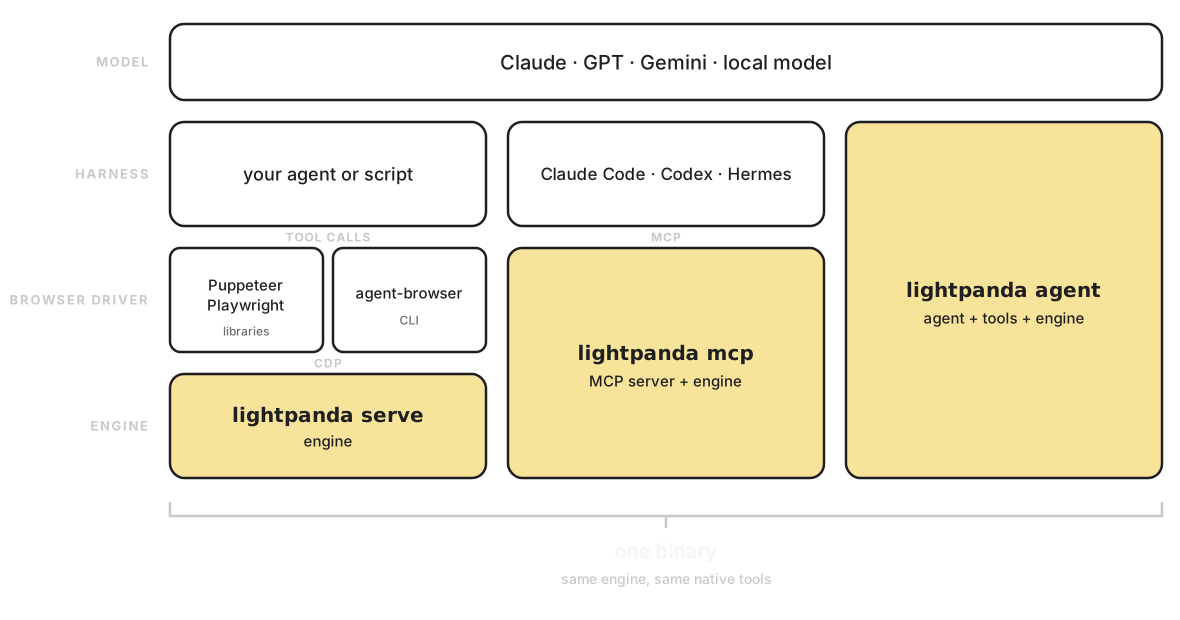
The browser agent stack
Every browser agent runs the same loop underneath. A model decides on an action, something executes that action against a browser, and the result comes back to inform the next decision. The stack that runs this loop has four layers.
The model. A large language model (LLM): Claude, GPT, Gemini, or a local model (e.g. Ollama). It reads context and picks the next action. It can’t fetch a page or click a button on its own.
The harness. The agent program wrapped around the model. It holds the conversation, exposes tools, executes tool calls, and feeds results back. Claude Code, Codex, OpenClaw, and Nous Research’s Hermes Agent all live here. These are generalists: they read files, run shell commands, manage repos, answer email. The browser is one tool among many.
The browser driver. The harness needs hands on the browser. agent-browser,
browser-use, Stagehand, and Lightpanda’s MCP server all live here, and so do
Puppeteer and Playwright, as libraries your code imports rather than tools an
agent calls. agent-browser is a clean example of the agent-facing shape: a CLI
with commands like open, snapshot, click, and get, translated into the Chrome
DevTools Protocol (CDP)
underneath. Lightpanda’s MCP server is the exception: MCP lets a harness call
our native tools directly, so nothing passes through
CDP on the way to the engine.
The engine. The browser itself. It loads pages and runs their JavaScript, exposing the resulting DOM (Document Object Model) to whatever sits above. Chromium is the default everywhere. Lightpanda is the alternative: built from scratch in Zig with no rendering pipeline, so it runs 9x faster and uses 16x less memory than headless Chrome.
Every boundary between layers is a translation. The harness serializes a tool call, the browser driver turns it into CDP messages, the engine executes, and the result climbs back up. Each step adds latency, CPU and memory usage. Everything that reaches the model costs tokens.
Where agent-browser sits
agent-browser is Vercel’s browser automation tool for AI agents, and it
occupies the browser driver layer. You open a page, take a snapshot, and get
back a compact accessibility tree where each element carries a short ref like
@e1. The agent reads the tree, picks a ref, and acts on it. A snapshot runs
around 200 to 400 tokens, against the 3,000 to 5,000 you’d spend dumping raw
DOM. browser-use and Stagehand work the same layer with different surfaces:
browser-use hands the model raw page HTML, and Stagehand mixes code with
natural language actions. Both require access to an LLM.
agent-browser doesn’t have its own browser. It needs an engine below it. That engine is Chromium by default, and Lightpanda with one flag:
export AGENT_BROWSER_ENGINE=lightpanda
agent-browser open https://example.com
agent-browser snapshot -i
Our guide to running agent-browser on Lightpanda covers the setup in detail.
Where Lightpanda agent sits
lightpanda agent covers the harness, the browser drivers, and the engine in a
single binary. Point it at a model provider (Anthropic, OpenAI, Gemini, Hugging
Face, Mistral or local) and talk to it in natural language.
Because the agent runs in-process against Lightpanda’s own engine, there’s no CDP inside the loop. A click is a native function call instead of a multiple messages over a WebSocket to a separate browser process.
Owning the loop has a second consequence: the LLM can run at buildtime instead of runtime. The agent works through a task once, then hands you a PandaScript , a plain JavaScript file that replays the session deterministically. Replays run with no model in the loop, so they cost zero tokens. You pay for reasoning once and keep the script.
agent-browser vs Lightpanda agent
agent-browser gives an agent you already run a way to drive a browser.
lightpanda agent is a browsing agent you run directly.
If you live inside Claude Code or Codex and want to give it web access, we
recommend using lightpanda mcp: native tooling the agent uses, exposed to your
harness directly over MCP. If the task itself is browsing (scraping, price
monitoring, form filling, scheduled checks), you can skip the harness and use
the specialist: lightpanda agent.
Agent-browser is also a strong choice, and it gets faster when you put Lightpanda underneath it. The two best configurations we’ve measured across our benchmarks are agent-browser on Lightpanda and Lightpanda’s native agent.
One binary
Lightpanda crosses three different parts of this stack, but they are all included in a single binary:
serve: the engine speaking CDP so existing Puppeteer and Playwright scripts, or agent-browser, can drive it.mcp: engine plus tool layer, for an external harness that brings its own model and loop.agent: engine, tools, and loop together, talking to the model directly, or to no model at all.
The MCP server and the agent are inside the browser binary itself, rather than as companion processes, and the MCP door exists precisely so other tools can use Lightpanda without adopting our agent.
The native tools are shared across all three. goto, click, fill, extract,
evaluate, and search are engine-level commands, and the same implementations
back the MCP server and the agent’s own loop.
None of this works as a bolt-on. A Chromium setup means an automation layer in its own Node or a Python process plus a browser process beside it, each one more thing to install and keep alive, and a protocol between them. Every call pays the translation tax: serialize, cross the process boundary, deserialize, and carry the result back. Because we built the browser from scratch , the snapshot logic sits next to the DOM it reads and the agent loop sits next to the engine it drives.
Try it
The agent tutorial walks you through a complete session: log in, extract data, save the script, replay it without a model. It takes under 10 minutes.
FAQ
What is the browser agent stack?
It’s the set of layers between a language model and a web page: the model that decides, the harness that runs the agent loop, the browser driver that executes actions, and the engine that loads web pages and runs JavaScript. Most browser agents wire four separate things together, one per layer. Lightpanda covers the bottom three layers in one binary, with the model as the only external piece.
What is agent-browser?
agent-browser is Vercel’s open-source browser automation tool for AI agents. A
harness like Claude Code shells out to it, receives pages as compact
accessibility-tree snapshots with short element refs, and acts on those refs.
It drives a browser over CDP: Chromium by default, or Lightpanda via the
--engine lightpanda flag.
How is Lightpanda agent different from agent-browser?
agent-browser sits in the middle of the stack, with a harness above it and a browser engine below it. Lightpanda agent covers the whole column: the loop, the native browser drivers, and the engine run in one process, with no CDP between the agent and the page. It can also record a session as a PandaScript and replay it with no model involved.
Can my existing agent use Lightpanda without the built-in agent?
Yes. Run lightpanda mcp and any MCP-aware harness, Claude Code included,
connects to the same native tool surface the built-in agent uses. Hermes Agent
supports Lightpanda as a browser backend. Existing Puppeteer and Playwright
scripts work against lightpanda serve over CDP.
Does Lightpanda agent use CDP?
No, deliberately. The agent calls the engine in-process, so a click is a native
function call rather than a protocol message to a separate browser. CDP support
continues through lightpanda serve, which we are actively developing for
Puppeteer, Playwright, and agent-browser users.
Is Lightpanda competing with generalist agents like Hermes or OpenClaw?
No. Generalist agents handle many kinds of work, and browsing is one tool among many for them. Lightpanda does the browsing and composes with generalists through its MCP server. Hermes Agent already supports Lightpanda as a browser backend.
Katie Brown
Cofounder & COO
Katie led the commercial team at BlueBoard, where she met Pierre and Francis. She rejoined them on the Lightpanda adventure to lead GTM and to keep the product closely aligned with what developers actually need. She also drives community efforts and, by popular vote, serves as chief sticker officer.