Speed up your Selenium scripts: Lightpanda now speaks WebDriver

Céline Debled
Developer Relations
TL;DR
Lightpanda 1.0 speaks WebDriver, classic and BiDi, making it the only browser that natively speaks every web automation protocol: CDP, WebDriver and MCP. Point your Selenium scripts at lightpanda serve --protocol webdriver instead of chromedriver, or let the lightpanda Python package start it for you, and they run unchanged. On the Selenium documentation tests Lightpanda supports today, it ran up to 4.4x faster than headless Chrome with 7x less memory. WebDriver support is still in progress, and your test suites will inform what we build next.
WebDriver, CDP and BiDi: three protocols, many clients
If you run Selenium scripts today, you already use WebDriver. Selenium is a client library. WebDriver is the protocol it speaks, a W3C standard that grew out of the Selenium project. Three protocols control browsers today:
| Protocol | How it talks | Who defines it | Main clients |
|---|---|---|---|
| WebDriver classic | HTTP. The browser only replies, so the client polls for changes | W3C | Selenium, WebdriverIO, Nightwatch, Appium |
| WebDriver BiDi | WebSocket, open both ways. The browser pushes events | W3C, still a draft | Selenium 4 BiDi APIs, WebdriverIO, Puppeteer |
| CDP | WebSocket, open both ways. The browser pushes events | Google, for Chromium browsers | Puppeteer, Playwright, chromedp, Rod |
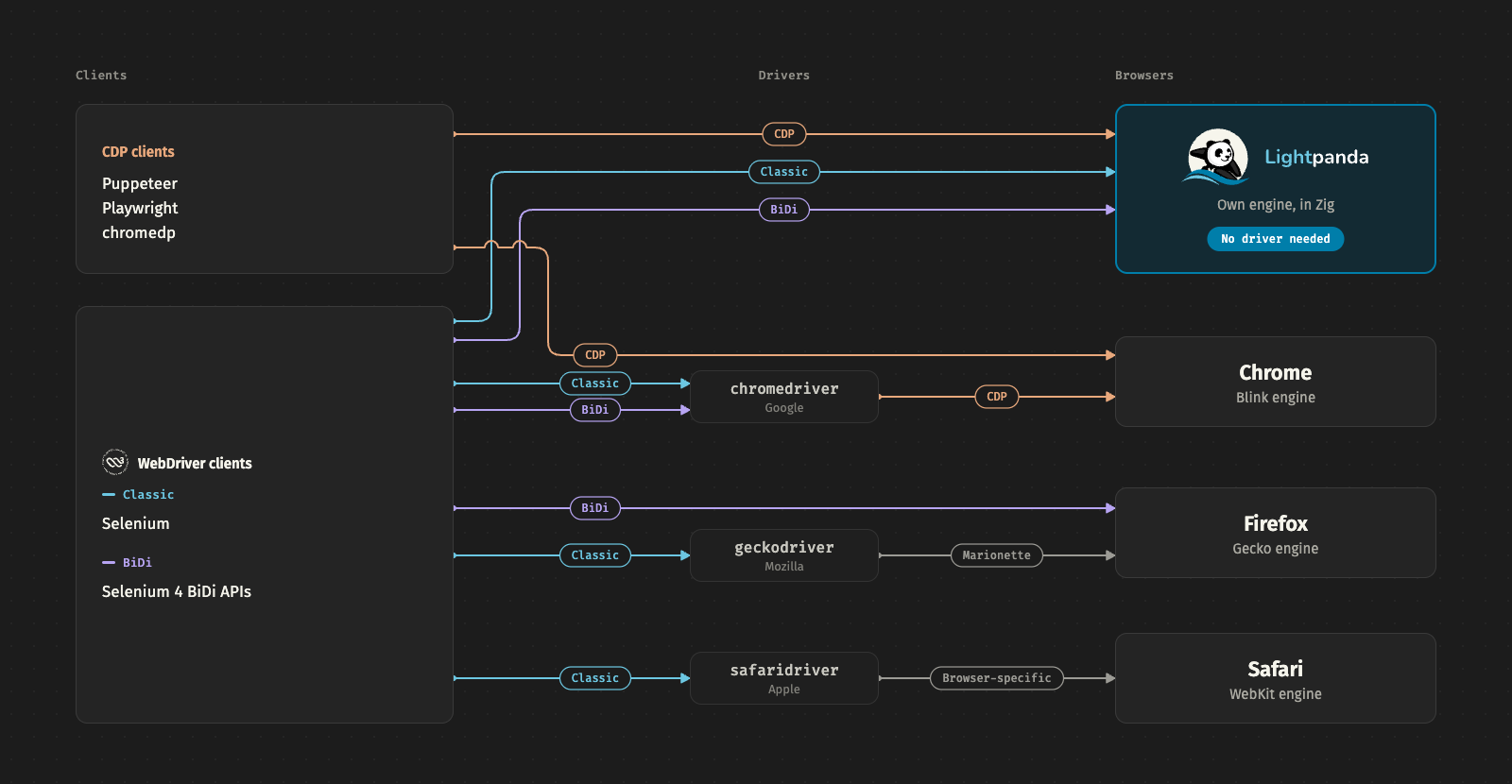
The protocol you pick decides what sits between your scripts and the browser.
WebDriver came first. It merged into Selenium in 2011 and became a W3C standard in 2018. Your test sends commands over HTTP to a driver, and each vendor ships its own: chromedriver for Chrome, geckodriver for Firefox, safaridriver for Safari. That driver is one more process to install and run next to every browser.
In parallel, Chrome started its own protocol. Since 2012 , the DevTools protocol (CDP) lets the inspector panel control a page over a WebSocket, so the browser can push events as they happen. It’s designed based on Chrome’s internals and covers much more than automation. In 2017 the Chrome team built Puppeteer on it. Playwright followed, and CDP became the de facto standard for automation. For a deeper look at how it works, see CDP under the hood .
WebDriver BiDi , still a W3C draft, tries to get the best of both worlds: a WebSocket for two-way communication and an open standard any browser can implement. The driver stays: with Chrome, chromedriver still opens the session and translates BiDi into CDP.
We wrote in more detail about the web automation stack and how it fits together as a whole.
Lightpanda natively speaks every web automation protocol
When we started Lightpanda, we asked what a browser would look like if it were built for machines . Our answer: no graphical rendering, and a browser your code controls directly, with no driver in between.
We started with CDP, so Puppeteer and Playwright scripts ran on Lightpanda from the start. With 1.0, Lightpanda adds WebDriver, classic and BiDi, so your Selenium suites can run on it too. It’s now the only browser that natively speaks every web automation protocol: CDP, WebDriver and MCP.
Running a Selenium test suite on Lightpanda
You need:
- Python 3 with Selenium and pytest :
pip install selenium pytest - Lightpanda 1.0 or later (see the installation guide ):
curl -fsSL https://pkg.lightpanda.io/install.sh | bash -s "1.0.0"The example runs two tests against quotes.toscrape.com , a public practice site. test_login submits the login form and waits for the Logout link. test_js_rendered_quotes checks quotes that JavaScript injects after the page loads.
conftest.py holds the pytest fixture that opens a new WebDriver session for each test. It is the only Lightpanda-specific code: webdriver.Remote connects Selenium to the running Lightpanda server instead of starting chromedriver.
# conftest.py
import pytest
from selenium import webdriver


@pytest.fixture
def driver():
    # `lightpanda serve --protocol webdriver` listens on port 9222 by default.
    d = webdriver.Remote(
        command_executor="http://127.0.0.1:9222",
        # Selenium requires an options object; Lightpanda accepts any browser's.
        options=webdriver.ChromeOptions(),
    )
    yield d
    d.quit()
test_quotes.py holds the tests. They are plain Selenium and run unchanged on Chrome.
# test_quotes.py
from selenium.webdriver.common.by import By
from selenium.webdriver.support import expected_conditions as EC
from selenium.webdriver.support.ui import WebDriverWait

BASE = "https://quotes.toscrape.com"


def test_login(driver):
    driver.get(f"{BASE}/login")
    driver.find_element(By.ID, "username").send_keys("panda")
    driver.find_element(By.ID, "password").send_keys("secret")
    driver.find_element(By.CSS_SELECTOR, "input[type=submit]").click()
    logout = WebDriverWait(driver, 5).until(
        EC.presence_of_element_located((By.LINK_TEXT, "Logout"))
    )
    assert logout.text == "Logout"


def test_js_rendered_quotes(driver):
    # Quotes on /js/ are injected by JavaScript, not in the HTML source.
    driver.get(f"{BASE}/js/")
    quotes = WebDriverWait(driver, 5).until(
        EC.presence_of_all_elements_located((By.CSS_SELECTOR, ".quote"))
    )
    assert len(quotes) == 10
    assert driver.find_element(By.CSS_SELECTOR, ".quote .author").text == "Albert Einstein"
Start Lightpanda in WebDriver mode, then run the suite from a second terminal:
lightpanda serve --protocol webdriverpytest -vcollected 2 items
test_quotes.py::test_login PASSED [ 50%]
test_quotes.py::test_js_rendered_quotes PASSED [100%]
============================== 2 passed in 1.20s ===============================With the Lightpanda Python package
If you’d rather not install the browser yourself, the lightpanda package bundles it and starts the server for you. Keep the same test_quotes.py and replace conftest.py:
pip install lightpanda selenium pytest# conftest.py
import pytest
from lightpanda import BiDiServer
from selenium import webdriver
@pytest.fixture(scope="session")
def server():
# Starts the Lightpanda binary bundled in the package.
with BiDiServer() as server:
yield server
@pytest.fixture
def driver(server):
d = webdriver.Remote(server.http_endpoint, options=webdriver.ChromeOptions())
yield d
d.quit()Then run pytest -v.
Benchmark: Selenium’s own tests on Chrome vs. Lightpanda
We ran the Python examples behind the Selenium documentation. We targeted the 66 tests that use standard WebDriver commands, and only changed the driver setup in conftest.py. The test pages are served locally, so network time stays out of the numbers.
Lightpanda passes 43 of the 66 tests (vs. 65 on Chrome). The tests Lightpanda fails use features we’re still building, listed below in what Lightpanda supports today. We timed the 43 tests that pass on both, each repeated 3 times. We ran one test at a time and 8 tests in parallel:
| Lightpanda 1.0.0 | Chrome 154 + chromedriver | |
|---|---|---|
| One at a time | 40.8 s, 74 MB | 105.2 s, 552 MB |
| 8 in parallel | 12.1 s, 97 MB | 53.8 s, 759 MB |
One at a time, Lightpanda was 2.6x faster with 7.5x less memory. With 8 tests in parallel, it was 4.4x faster with 7.8x less memory. Each Chrome session starts its own process tree, while a Lightpanda session is a context inside one running process.
The results are medians of 5 runs on a GitHub Actions Linux runner (2 CPUs, 8 GB of RAM), against headless Chrome 154. The scripts and exact versions are in this Gist .
Tips for running it in CI
Start the server in the background before the tests. It starts almost instantly:
lightpanda serve --protocol webdriver &
pytest
Raise the session limit if your tests run in parallel. Runners such as pytest-xdist (pytest -n) or Selenium Grid open one session per worker, and Lightpanda accepts 16 at once by default. Set --cdp-max-connections (which covers WebDriver sessions too) to about 1.5x your worker count, because a closed session needs time to free its slot. For 32 workers:
lightpanda serve --protocol webdriver --cdp-max-connections 48Call driver.quit() in every test. With Chrome, a forgotten session dies with the pytest process. With a shared Lightpanda server, it keeps its slot until the 60-second idle timeout, and enough of them make the next run fail with too many sessions.
What Lightpanda 1.0 supports today
The table compares what Lightpanda supports over each protocol.
| Capability | Classic | BiDi |
|---|---|---|
| Sessions (one per test) | ✅ | ✅ |
| Navigation | ✅ get, back, forward, refresh | ⚠️ navigate only |
| Find elements | ✅ CSS, ID, XPath, link text | ✅ locateNodes |
| Element state: text, attributes, displayed | ✅ | ✅ through JavaScript |
| Click, type, clear | ✅ | ✅ through input actions |
| Execute JavaScript | ✅ sync and async | ✅ evaluate, callFunction. Not yet: preload scripts |
| Keyboard and mouse actions | ⚠️ Not yet: pen, back/forward buttons | ⚠️ Not yet: file inputs |
| Cookies | ✅ | ❌ |
| Waits | ⚠️ explicit only, implicit not enforced | n/a |
| New tabs and windows | ❌ | ✅ create, close |
| Frames | ❌ | ❌ |
| Alerts, confirms, prompts | ❌ | ❌ |
| Shadow DOM | ❌ | ❌ |
| Events (console, network) | n/a | ⚠️ navigation and context events only |
| Network interception | n/a | ❌ |
| Screenshots | ⚠️ text render | ❌ |
| Layout, visual checks | ❌ by design | ❌ by design |
To connect over BiDi, see our docs for Selenium , in JavaScript and Python, and for Puppeteer .
Tell us what your suite needs
WebDriver support is new, and real test suites will inform what we build next. Run yours against Lightpanda 1.0:
lightpanda serve --protocol webdriverIf something fails, open an issue on GitHub . To help us reproduce it, include:
- the output of
lightpanda version, - your client and its version (for example Selenium 4.50 for Python),
- the failing command or a minimal test, with the URL,
- the error message, and the Lightpanda logs if you have them.
FAQ
Is Selenium the same as WebDriver?
No. WebDriver is a W3C protocol that defines how a client controls a browser. Selenium is the most widely used client library that speaks it. WebdriverIO and Appium speak the same protocol, so they can also connect to any WebDriver server, including Lightpanda.
Does Selenium use CDP or WebDriver?
Selenium sends WebDriver commands. When Selenium drives Chrome, chromedriver translates those commands into CDP calls behind the scenes. Selenium 4 also exposes some CDP features directly for Chromium browsers, but the project is moving those to WebDriver BiDi, which works across browsers.
What is WebDriver BiDi?
WebDriver BiDi is the bidirectional version of the WebDriver standard. It’s still a W3C draft, built on WebSocket. The browser can push events to the client, such as console messages or network activity, which classic WebDriver’s request-response model cannot do. It gives cross-browser automation the event model that used to require Chrome’s CDP.
Do I need chromedriver to use Selenium with Lightpanda?
No. Lightpanda implements the WebDriver protocol itself. Start lightpanda serve --protocol webdriver and connect Selenium to it with webdriver.Remote. Lightpanda is the only binary you install.
How much faster is Lightpanda than headless Chrome for Selenium tests?
On the 43 tests from Selenium’s documentation examples that pass on both browsers, Lightpanda 1.0.0 was 2.6x faster than headless Chrome 154 with 7.5x less memory (74 MB against 552 MB). With 8 tests in parallel, it was 4.4x faster with 7.8x less memory.
Can Lightpanda replace Chrome for every Selenium test?
No. Lightpanda has no graphical rendering, so it does not fit tests that check layout or compare pixel screenshots. Some WebDriver commands, such as frames and alerts, are not supported yet. It fits functional tests today: forms, navigation, JavaScript-built content and assertions on text and attributes.
Céline Debled
Developer Relations
Céline runs Developer Relations at Lightpanda. She started out as a full-stack web developer, then spent four years working with DevTools founders at Agoranov (a Paris startup incubator). At Lightpanda she writes the docs and demos, talks to developers building on the browser, and gets their feedback back to the engineering team. If you are stuck on something, she is the person to ask.