The Web Automation Stack Explained

Katie Brown
Cofounder & COO
TL;DR
The web automation ecosystem looks crowded, but the picture is actually simpler than meets the eye. At the bottom sits a browser engine. On top of that, a protocol (CDP). Historically, libraries like Puppeteer and Playwright sat above the protocol as the main way developers talked to browsers. That’s changing with a growing number of agent frameworks now implementing their own CDP clients directly, bypassing Puppeteer and Playwright entirely. Above all of this sits a wave of AI agent frameworks, data extraction APIs, and cloud browser providers.
Every automation tool needs a browser
If you’re building anything that interacts with the web programmatically, you need a browser at some point.
Ten years ago, you could get away with HTTP requests and an HTML parser. Libraries like BeautifulSoup and Scrapy handled most jobs. Since modern websites rely on JavaScript to render content, often the data you need only exists after JavaScript executes.
This shift turned browser automation from a niche concern into core infrastructure. Whether you’re running end-to-end tests, crawling product prices, or building an AI agent that books flights, you need something that can fetch pages, run JavaScript, and expose the resulting DOM.
The question is: which browser?
The browser engine layer
The ecosystem has dozens of tools, frameworks, and services. It feels fragmented, but if you zoom out, virtually all of them sit on top of one of two browser engines.
Chromium is the dominant one. Google’s open-source browser project powers Chrome, Edge, Brave and Opera. Every headless browser service you’ve heard of spins up a cloud browser instance running Chromium (or a patched fork of it). When Playwright, Puppeteer or Selenium launches a browser, that’s Chromium too by default.
Lightpanda is built from scratch in Zig , designed specifically for headless automation workloads with full JavaScript execution and no graphical rendering. Lightpanda implements the same Chrome DevTools Protocol (CDP) that the rest of the ecosystem speaks, so your existing Puppeteer and Playwright scripts work with a one-line change: swap the connection URL.
Two other browser engines exist but see little use in automation. Firefox (Gecko) powers the Firefox browser. WebKit powers Safari. Playwright supports both, and Selenium can drive Firefox through GeckoDriver. However, in production automation, neither has meaningful adoption. The automation ecosystem standardized on CDP, and Mozilla’s CDP support was always partial and experimental. They deprecated it in 2024 in favor of WebDriver BiDi, a newer W3C standard that hasn’t yet reached the same level of adoption. WebKit’s automation support is similarly limited to Playwright’s own integration. No major cloud browser provider runs Firefox or WebKit at scale.
The protocol layer: CDP
The Chrome DevTools Protocol (CDP) is the interface between your code and the browser. Originally built for Chrome DevTools (the inspector you open with F12), CDP provides programmatic access to page navigation, DOM queries, JavaScript execution, network interception, and input simulation.
CDP has become the de facto standard. It offers over 650 commands across 200 domains . Puppeteer, Playwright, chromedp, rod, and Stagehand all speak CDP under the hood.
This matters because it means the browser engine you choose is independent of the libraries and frameworks above it. If a tool speaks CDP, it can connect to any browser that implements CDP.
We’ve written extensively about CDP’s design limitations for automation . The short version: CDP was built for debugging, not for machines. But it’s the standard the ecosystem has settled on, and any serious browser engine needs to support it.
The library layer: Puppeteer and Playwright
On top of CDP, two libraries dominate.
Puppeteer is Google’s Node.js library for controlling Chrome/Chromium. It was the first mainstream CDP automation library, released in 2017. Puppeteer gives you a clean API for navigating pages, clicking elements, extracting content, intercepting network requests, and taking screenshots. It’s Chrome-first and battle-tested.
Playwright is Microsoft’s answer, released in 2020. Built by several of the same engineers who created Puppeteer, Playwright supports Chromium, Firefox, and WebKit. It adds features like auto-waiting, built-in test runners, and better handling of multiple browser contexts. Playwright has 45.1% adoption among QA professionals and continues to grow.
Both libraries abstract CDP into developer-friendly APIs. When you write await page.click('a.title') in Puppeteer, the library translates that into multiple
CDP commands: finding the element, getting its coordinates, dispatching mouse
events. You don’t see the protocol. You see a clean interface.
There’s also Selenium , the oldest browser automation tool (2004). Selenium uses a different protocol (WebDriver) but remains widely used, particularly in enterprise environments and for cross-browser testing. It’s more verbose and slower than Puppeteer or Playwright, but it supports a broader range of browsers and programming languages.
Here’s how connecting to Lightpanda looks with each library:
With Puppeteer:
import puppeteer from 'puppeteer-core';

const browser = await puppeteer.connect({
  browserWSEndpoint: 'ws://127.0.0.1:9222'
});
const context = await browser.createBrowserContext();
const page = await context.newPage();

await page.goto('https://example.com');
const title = await page.title();
console.log(title);

await page.close();
await context.close();
await browser.disconnect();
With Playwright:
import { chromium } from 'playwright-core';

const browser = await chromium.connectOverCDP('ws://127.0.0.1:9222');
const context = await browser.newContext();
const page = await context.newPage();

await page.goto('https://example.com');
const title = await page.title();
console.log(title);

await page.close();
await context.close();
await browser.close();
The same scripts work against Chromium or Lightpanda. You change the WebSocket URL and nothing else.
The framework layer: AI agents and natural language
Above Puppeteer and Playwright, a new layer has emerged. These are frameworks that add AI reasoning to browser control. Increasingly, they talk to the browser directly over CDP rather than going through Puppeteer or Playwright.
agent-browser (by Vercel) is a CLI tool that gives AI coding agents direct browser control. It supports over 100 commands (open, click, fill, snapshot, screenshot) and connects via CDP. Its snapshot command outputs a clean accessibility tree with reference IDs that AI models can reason about. It works with Claude Code, Cursor, Windsurf, and other MCP-aware agents. agent-browser supports both Chrome and Lightpanda as engine options , making it one of the first agent frameworks to offer a non-Chromium alternative out of the box.
Stagehand lets you mix deterministic code with
natural language actions. You can write await stagehand.act("click the sign-in button") instead of hunting for CSS selectors. Stagehand started as a layer on
Playwright, and moved to speak CDP
directly for better
performance. It’s open source and supports multiple LLM providers. Lightpanda
is compatible with
Stagehand , so you
can use it as a drop-in engine replacement.
Other notable frameworks include Browser Use , which lets you describe tasks in natural language and have an autonomous agent execute them, and Notte , which combines browser infrastructure, AI agents, and serverless compute in a single platform.
Browser control is also showing up inside broader personal agent projects like OpenClaw , which can drive an isolated Chrome profile as one tool among many. All of these frameworks face the same fundamental dependency: they need a browser underneath.
Cloud browser providers: browsers as a service
Running headless browsers at scale is operationally painful. Memory leaks, process crashes, proxy rotation, CAPTCHA solving, bot detection. A whole category of companies exists to handle this for you, including Kernel , Browserbase , Anchor , Browserless , and Steel.dev . They each take different approaches to session management, stealth, pricing, and deployment models. Some are fully managed, others offer self-hosted options.
What they all share: every one of them runs on Chromium. They’ve each forked and patched it to varying degrees for anti-detection and reliability, but the underlying engine is the same.
Lightpanda Cloud offers an alternative. Instead of running patched Chromium, you connect to a Lightpanda instance that runs 9x faster, uses 16x less memory and starts nearly instantly. For workloads where you need throughput and efficiency over graphical rendering, it changes the cost equation. Lightpanda is still in beta and doesn’t work on every website. That’s why Lightpanda offers a generous free tier, so you can test your use case. You can switch between Lightpanda and Chrome on the same API to debug with Chrome.
Data extraction APIs: browsers you don’t see
Some companies hide the browser entirely and sell you the data. Services like Firecrawl and ScrapingBee let you send a URL and get back clean markdown, HTML, or structured data. They handle JavaScript rendering, proxy rotation, and anti-bot measures behind the scenes. Under the hood, they’re still running browser instances powered by Chromium, then converting the output to markdown in a separate step.
These services are useful when you don’t need to interact with pages and you
just need the content. But because Lightpanda controls the browser engine, it
can do this conversion
natively . Call
LP.getMarkdown via CDP or run lightpanda fetch --dump markdown from the CLI
and you get clean, LLM-ready markdown directly from the DOM after JavaScript
execution. If your use case is extracting page content for an LLM, you can skip
the data extraction API entirely and get the output straight from the browser.
How the stack fits together
Here’s the full picture, from bottom to top
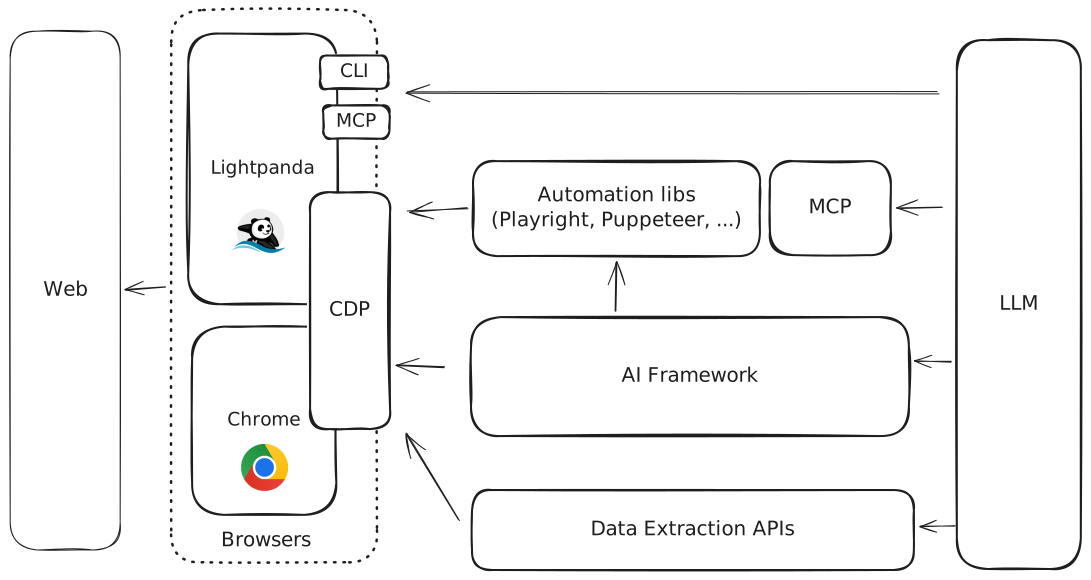
Browser engines (Chromium, Lightpanda) execute HTML, CSS, and JavaScript. They expose CDP.
CDP is the protocol. It’s how everything above talks to the browser.
Automation libraries (Puppeteer, Playwright, Selenium) wrap CDP in developer-friendly APIs.
AI frameworks add natural language and LLM reasoning on top of those libraries.
Cloud providers host and manage browser instances at scale.
Data APIs abstract everything away and return clean data.
Every layer depends on the one below it. And at the very bottom, it’s a browser engine running JavaScript and building a DOM.
Why the browser engine matters
When the entire stack sits on one engine, that engine’s characteristics ripple upward.
Chromium is a full desktop browser. Even in headless mode, it calculates layout, compositing, and rendering pipelines. It consumes hundreds of megabytes per instance and it takes seconds to start. These costs multiply at scale.
Lightpanda strips away everything unnecessary for automation. There’s no rendering pipeline, GPU code or compositor. The result is 9x faster execution and 16x less memory compared to headless Chrome on equivalent workloads. Startup is near-instant.
But performance is only half the story. Because we built the engine from scratch, we can add capabilities that are impossible when you’re building on top of Chromium.
Lightpanda converts pages to markdown and accessibility trees natively inside
the browser engine, after JavaScript execution. You call LP.getMarkdown via CDP
or use the CLI with --dump markdown and get clean, LLM-ready output directly
from the DOM. The same goes for the accessibility tree (AXTree), which gives AI
agents a structured, semantic representation of the page that’s far more useful
than raw HTML. Cloudflare measured an 80% token reduction when converting HTML
to markdown for LLM consumption. Lightpanda does this at the engine level, with
zero external dependencies.
Lightpanda also has a native MCP
server built
directly into the browser binary. Run lightpanda mcp and you get a Model
Context Protocol server over stdio that any MCP-aware agent (Claude, Cursor,
Windsurf) can connect to. The MCP server shares the same process as the browser
engine with no CDP intermediary and no extra processes. It exposes tools like
goto, markdown, links, evaluate, click, fill, and semantic_tree.
An AI agent can navigate to a page, extract its content as markdown, interact
with forms, and read structured data, all through a single lightweight process.
None of this is possible when you’re wrapping Chromium. You can bolt on an HTML-to-markdown converter after the fact. You can run a separate MCP server that talks to a headless Chrome instance over CDP, but that means extra processes and latency. When you control the engine, these features can live inside the browser itself and the boundary between “browser” and “AI tool” disappears.
For cloud providers, this means dramatically more browser sessions per server. For AI agents, it means lower latency on every web interaction and outputs that are purpose-built for LLMs. For data extraction, it means faster page processing at lower cost.
The browser engine is the foundation. When you change the foundation, everything above it benefits.
Where to start
If you’re building web automation today, here’s a practical path:
Pick your library. Puppeteer if you’re Chrome-first and want simplicity. Playwright if you need cross-browser support or better testing tools.
Try Lightpanda. Swap your connection URL and run your existing scripts. If they work, you get the performance benefits with zero code changes.
The quickstart guide gets you running in under 10 minutes. You can run locally, use Docker, or connect to Lightpanda Cloud .
docker run -d --name lightpanda -p 127.0.0.1:9222:9222 lightpanda/browser:nightlyThen point your existing scripts at ws://127.0.0.1:9222 and see the difference.
FAQ
What is a headless browser?
A headless browser is a web browser without a graphical interface. It runs in the background, controlled by code. It can fetch pages, execute JavaScript, interact with the DOM, and handle network requests. Headless browsers are used for automated testing, web scraping, and powering AI agents that need to browse the web.
What browser engine does Playwright use?
Playwright supports three browser engines: Chromium, Firefox (Gecko), and WebKit (Safari’s engine). For headless automation and scraping, most developers use Playwright with Chromium. Playwright also supports connecting to external CDP-compatible browsers like Lightpanda via chromium.connectOverCDP().
What is CDP and why does it matter?
CDP stands for Chrome DevTools Protocol. It’s the communication interface between automation code and the browser. CDP provides commands for navigation, DOM access, JavaScript execution, network interception, and input simulation. Every major automation library (Puppeteer, Playwright, Stagehand) uses CDP to control browsers.
How is Lightpanda different from headless Chrome?
Lightpanda is built from scratch for automation. It doesn’t include Chromium’s rendering pipeline, GPU code, or compositor. This makes it 9x faster and 16x more memory-efficient than headless Chrome. Lightpanda implements CDP, so existing Puppeteer and Playwright scripts work with a connection URL change.
Can I use Lightpanda with AI frameworks?
Yes. Any framework that connects to a browser via CDP can use Lightpanda. You point the framework’s browser connection to Lightpanda’s WebSocket endpoint instead of a Chromium instance.
When should I use Chromium instead of Lightpanda?
Use Chromium when you need graphical rendering, like screenshots or PDF generation. Lightpanda is optimized for automation workloads where you need DOM access and JavaScript execution, not visual output. The recommended approach: try Lightpanda first, fall back to Chromium when needed.
Katie Brown
Cofounder & COO
Katie led the commercial team at BlueBoard, where she met Pierre and Francis. She rejoined them on the Lightpanda adventure to lead GTM and to keep the product closely aligned with what developers actually need. She also drives community efforts and, by popular vote, serves as chief sticker officer.