Lightpanda for Python: a browser in one pip install

Adrià Arrufat
Software Engineer
TL;DR
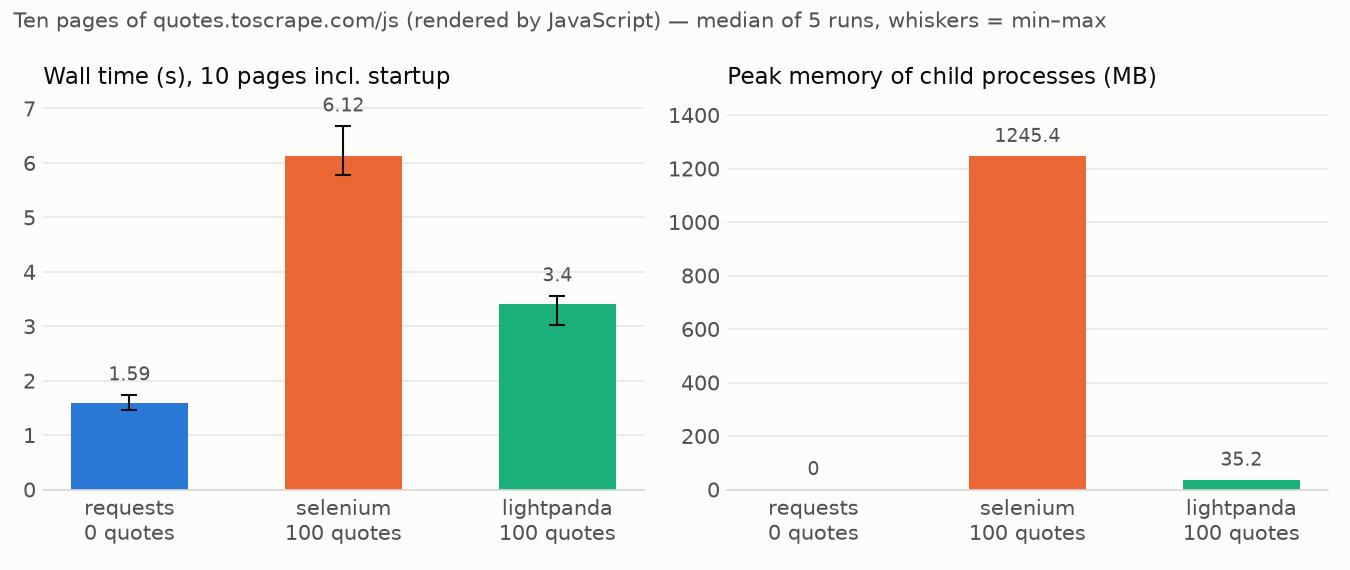
pip install lightpanda installs the browser binary and the Python bindings together. One command, and the browser comes with it. You import Browser, call page.goto, pull structured data with page.extract, and the result drops straight into pandas, numpy, or scikit-learn. On the same 100-quote scrape, Lightpanda finishes in about 3 seconds using 35 MB, against about 6 seconds and 1.2 GB for Selenium with headless Chrome (median of 5 runs ).
The web is turning into machine traffic, and machine traffic runs on Python
More of the web is browsed by code than ever, and a growing share of that comes from AI agents . Most agents are built in Python because that is where the models, frameworks, and data tooling already live. When your agent or scraper reaches for a browser, that browser should live in the same place.
Today it usually doesn’t. The most common setup is a Python script talking to a Node.js process that speaks the Chrome DevTools Protocol (CDP) and manages a downloaded Chromium build. The result is you are running two language runtimes to load one page.
Lightpanda is a headless browser written from scratch for machines, with no graphical rendering. pip install lightpanda puts it inside the Python stack, so you drive it from Python without a Node.js runtime sitting between you and the page.
One command, browser included
Here is the whole install:
pip install lightpanda
That pulls a wheel with the Lightpanda browser binary bundled in. You get the bindings and the engine in one step.
To drive a browser from Python today you install a client library, a Node.js runtime for the CDP layer, and a Chromium build the library downloads on its own. The Lightpanda wheel carries the browser with it, so the browser version tracks the package version and there is no second moving part to keep in sync.
Because it is a native Python module, the rest of your stack stays exactly as it is. Scraped data comes back as Python objects and goes straight into pandas or numpy.
When you actually need a browser
Not every scrape needs one. If the page you want is server-rendered, an HTTP request and an HTML parser are faster and cheaper, and you should use them. But that covers less of the web than you might think: Zyte’s State of Web Access 2026 found that just over 40% of popular landing pages need JavaScript rendering to return meaningful content. On those sites, the HTML you get from a plain request is an empty shell or a challenge page, and the data only appears after the page’s scripts run. We wrote about that shift here .
So the choice for JavaScript pages comes down to one option: a full browser over Selenium or Playwright. This allows you to execute the JavaScript, but wiring up a Node.js client and a Chromium download is a heavy setup for what is often a small job.
With Lightpanda’s Python SDK , you get real JavaScript execution from a browser that uses an order of magnitude less memory than a Node.js and Chrome stack , without leaving Python.
A working example
Take quotes.toscrape.com/js , a page whose quotes are drawn entirely by client-side JavaScript. A plain HTTP request returns zero quotes, because the DOM is only built after the script runs.
Here is the full scrape with Lightpanda. Browser() starts the bundled binary and stops it when the with block exits. page.extract takes a schema of CSS selectors and returns records:
from collections import Counter

from lightpanda import Browser

SCHEMA = {
    "quotes": [
        {
            "selector": ".quote",
            "fields": {"text": ".text", "author": ".author", "tags": [".tag"]},
        }
    ],
    "next": {"selector": "li.next a", "attr": "href"},
}

with Browser() as browser, browser.new_session() as page:
    quotes = []
    url = "https://quotes.toscrape.com/js/"
    while url:
        page.goto(url=url)
        data = page.extract(schema=SCHEMA)
        quotes.extend(data["quotes"])
        url = data["next"]

    print(f"{len(quotes)} quotes")
    tags = Counter(tag for q in quotes for tag in q["tags"])
    print("Top tags:", tags.most_common(5))
Run it and you get every quote across all ten pages:
$ python scrape.py
100 quotes
Top tags: [('love', 14), ('inspirational', 13), ('life', 13), ('humor', 12), ('books', 11)]
The tags field is declared as a list, so extract resolves every .tag inside each quote into a Python list. What comes back is already the shape you want to hand to Counter, and from there to pandas.
Scraping many pages at once
When you want pages in parallel instead of one after another, use AsyncBrowser. Every method becomes awaitable, and each call runs on the browser’s own thread pool, so it never blocks your event loop. browser.session() opens a session scoped to one task and closes it when the task ends:
import asyncio
from collections import Counter

from lightpanda import AsyncBrowser

SCHEMA = {
    "quotes": [
        {
            "selector": ".quote",
            "fields": {"text": ".text", "author": ".author", "tags": [".tag"]},
        }
    ],
}

URLS = [f"https://quotes.toscrape.com/js/page/{n}/" for n in range(1, 11)]

async def scrape_one(browser, url):
    async with browser.session() as page:
        await page.goto(url=url)
        data = await page.extract(schema=SCHEMA)
        return data["quotes"]

async def main():
    async with AsyncBrowser() as browser:
        results = await asyncio.gather(*(scrape_one(browser, url) for url in URLS))
    quotes = [q for page_quotes in results for q in page_quotes]
    print(f"{len(quotes)} quotes")

asyncio.run(main())
This pattern scales. One browser, many sessions, fired off with asyncio.gather.
The payoff: 19,219 papers that an ordinary scraper can’t read
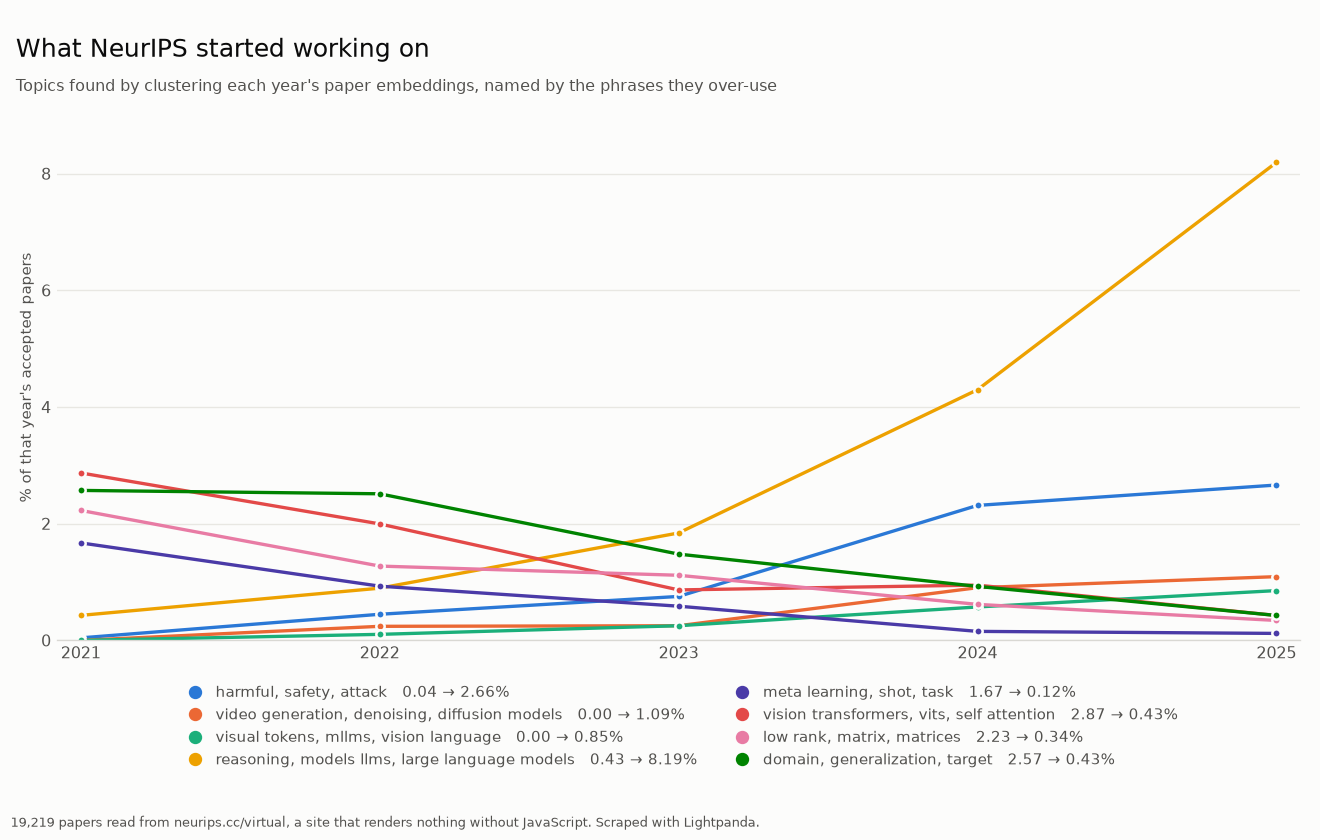
Here is what that looks like on a real site. We pointed Lightpanda at the NeurIPS proceedings and scraped every paper from 2021 to 2025 (19,219 in total).
Each year’s page is around 800 KB of scripts wrapped around an empty list, with a note telling you to enable JavaScript to see the papers. requests plus BeautifulSoup finds zero papers, because there is no paper in the HTML until the JavaScript runs.
Rendering the page is necessary but still not enough on its own. A single year pulls down a 27 MB index and keeps all 5,858 of its papers in memory, but only ever draws 400 of them on screen. The rest exist only while the page is live, inside the running document. Lightpanda reads the full list straight out of the live DOM.
The run itself is small: one browser process per year, five years going at once. About a minute for the whole run. From there it is the standard Python stack with nothing swapped out: pandas, numpy, scikit-learn, matplotlib.
Below are the results of the run. The code to reproduce it is here .
Try it on your own scrape
The Python SDK guide walks through the full example and runs in about ten minutes. Install the package, point it at a page your current scraper struggles with, and see what comes back.
pip install lightpanda
FAQ
What is the difference between pip install lightpanda and driving Lightpanda from Playwright?
The lightpanda package bundles the browser binary and gives you a native Python API, so there is no client to wire up and no separate browser download. Driving Lightpanda from Puppeteer , Playwright or Selenium still works and connects over CDP, but it means running those clients and their dependencies. Use the Python SDK when you want the whole thing inside Python.
Does the Python SDK execute JavaScript?
Yes. It runs a real browser engine with V8, so client-side JavaScript executes and the DOM is fully built before you read it. That is the whole reason to use it over requests, which returns the initial HTML and never runs the page’s scripts. If you already have a PandaScript file, you can run it directly from Python and get the output back.
How much memory does it use compared to Chrome?
On a 100-quote scrape, the SDK finished in about 3 seconds using 35 MB, against about 6 seconds and 1.2 GB for Selenium with headless Chrome, as a median of 5 runs on the project’s own benchmark. Lightpanda has no rendering pipeline, which is where most of Chrome’s memory goes.
Do I need Node.js installed?
No. The Python SDK talks to the bundled browser directly, so Python 3.10 or newer is the only requirement.
Can I scrape many pages concurrently?
Yes. Use AsyncBrowser and open one session per task with browser.session(), then run them together with asyncio.gather. Each call runs on the browser’s own thread pool, so it does not block your event loop, which also makes it safe inside an async web server.
How do I get structured data instead of raw HTML?
Call page.extract with a schema of CSS selectors. Each entry maps a field name to a selector, and declaring a field as a list resolves every match inside the element. You get Python dictionaries and lists back, ready for pandas.
How do I respect robots.txt?
The browser can enforce robots.txt for you. It is off by default, matching the lightpanda binary’s own default, and every wrapper takes browser flags through args=:
Browser(args=["--obey-robots"])                    # also AsyncBrowser
CDPServer(args=["--obey-robots"])                  # also BiDiServer, and the async twins
run_script("saved.js", args=["--obey-robots"])
A request the site disallows then fails rather than being sent: a tool call raises ToolError: navigation failed: RobotsBlocked, and run_script raises ScriptError.
One thing to know before turning it on, because it is easy to mistake for a bug: the rule is applied to every request, not just the page you asked for. Plenty of sites disallow the directory their own assets live in, so a page you are allowed to fetch can load with its scripts and styles missing, and render blank or empty. That is robots.txt being honored, not a failure: the site is asking you not to fetch those files. If a page comes back strangely empty under --obey-robots, read the site’s robots.txt before assuming it’s a bug.
Adrià Arrufat
Software Engineer
Adrià is an AI engineer at Lightpanda, where he works on making the browser more useful for AI workflows. Before Lightpanda, Adrià built machine learning systems and contributed to open-source projects across computer vision and systems programming.