Markdown and AXTree
Lightpanda outputs web page content as Markdown and Accessibility tree directly from its browser engine, after JavaScript execution. No external HTML-to-Markdown converter needed.
Overview
Three ways to get Markdown and Accessibility tree from any web page:
| Pathway | Best for | How |
|---|---|---|
CLI fetch --dump markdown | Scripts, pipelines, quick extraction | Single command, stdout |
CDP LP.getMarkdown | Puppeteer/Playwright automation | Programmatic, after page interactions |
| MCP server | AI agent / LLM tool integration | Model Context Protocol over stdio |
CLI: fetch --dump
The fetch command fetches a URL, executes JavaScript, and dumps the result to stdout. Runs standalone with no browser session or CDP connection needed.
Syntax
lightpanda fetch --dump <format> [options] <URL>

# Formats:
#   html                Full rendered HTML (post-JS)
#   markdown            CommonMark markdown
#   semantic_tree       JSON accessibility tree
#   semantic_tree_text  Human-readable accessibility tree
Output formats
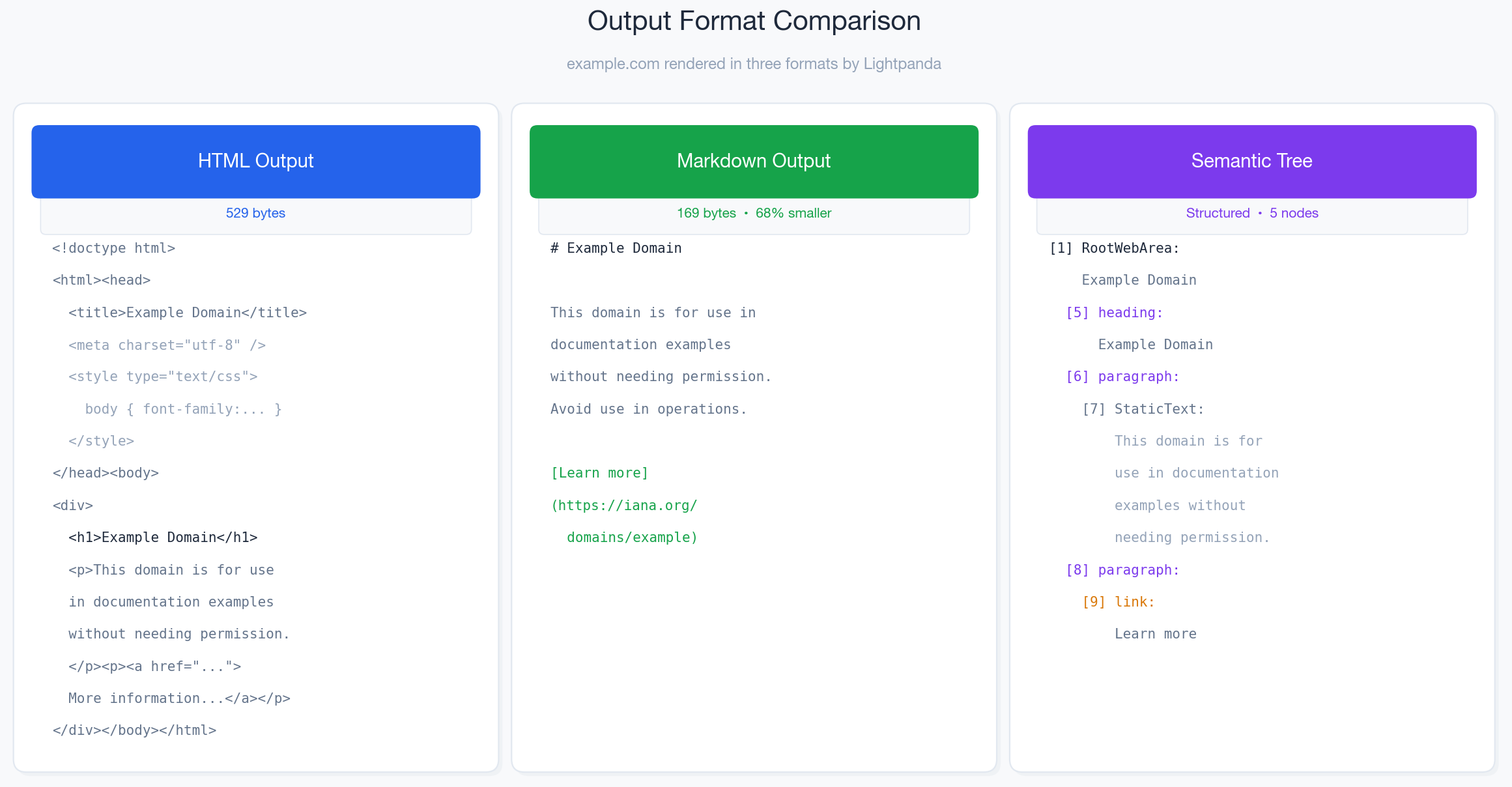 The same page (example.com) in three output formats. Markdown strips all non-semantic markup for a smaller representation.
| Format | Description | Best for |
|---|---|---|
html | Full post-JS DOM as HTML | Archiving, diffing, debugging |
markdown | CommonMark markdown (links, headings, lists, tables) | AI/LLM context, summarization |
semantic_tree | Full accessibility tree as structured JSON | Accessibility audits, structured parsing |
semantic_tree_text | Indented human-readable accessibility tree | Quick accessibility review, debugging |
Basic example
./lightpanda fetch --dump markdown https://example.comExample output
# Example Domain

This domain is for use in documentation examples without needing permission. Avoid use in operations.

[Learn more](https://iana.org/domains/example)
--with-frames flag
Includes rendered iframe content in the output. Without it, iframe content is excluded.
# Without iframe content (default)
./lightpanda fetch --dump markdown https://example.com

# With iframe content included
./lightpanda fetch --dump markdown --with-frames https://example.com
On pages without iframes, output is identical either way.
--strip-mode flag
Removes groups of tags from the output. Values can be combined with commas:
# Remove JavaScript and CSS from output
./lightpanda fetch --dump html --strip-mode js,css https://example.com

# Remove all UI, scripts and styles
./lightpanda fetch --dump html --strip-mode full https://example.com| Value | Tags removed |
|---|---|
js | script, link[as=script], link[rel=preload] |
css | style, link[rel=stylesheet] |
ui | img, picture, video, svg, style, link[rel=stylesheet] |
full | Combines js + ui + css |
Semantic tree output
The semantic_tree format returns the page’s accessibility tree as structured JSON:
./lightpanda fetch --dump semantic_tree https://example.comEach node includes:
| Field | Type | Description |
|---|---|---|
nodeId | string | Unique node identifier |
backendDOMNodeId | integer | Backend DOM node ID |
nodeName | string | HTML element name (e.g., h1, p, a, text) |
xpath | string | XPath to the node |
nodeType | integer | DOM node type (1 = element, 3 = text, 9 = document) |
isInteractive | boolean | Whether the element is interactive |
role | string | ARIA role (e.g., heading, paragraph, link, none) |
name | string | Computed accessible name |
nodeValue | string | Text content (for text nodes) |
attributes | object | HTML attributes (e.g., href, lang) |
children | array | Child nodes |
Example output (first two levels)
{
  "nodeId": "1",
  "backendDOMNodeId": 1,
  "nodeName": "root",
  "xpath": "",
  "nodeType": 9,
  "children": [{
    "nodeId": "2",
    "backendDOMNodeId": 2,
    "nodeName": "html",
    "xpath": "/html[1]",
    "nodeType": 1,
    "isInteractive": false,
    "role": "none",
    "attributes": {"lang": "en"},
    "children": ["..."]
  }]
}
The semantic_tree_text format outputs the same data in a compact readable form:
./lightpanda fetch --dump semantic_tree_text https://example.comExample output
[1] RootWebArea: Example Domain
  [5] heading: Example Domain
  [6] paragraph:
    [7] StaticText: This domain is for use in documentation examples without needing permission. Avoid use in operations.
  [8] paragraph:
    [9] link: Learn more
The CLI
semantic_treeand the CDPAccessibility.getFullAXTreereturn different JSON schemas. The CLI uses flat field names (role,nameas strings); CDP uses typed objects (e.g.,role: { type: "role", value: "heading" }). See CDP: Accessibility tree for the CDP schema.
CDP: LP.getMarkdown
In server mode (lightpanda serve), Lightpanda exposes a WebSocket CDP endpoint with a custom LP domain. LP.getMarkdown converts the current page’s live DOM to Markdown.
Unlike --dump markdown which processes a URL from scratch, LP.getMarkdown converts the DOM at call time. You can click, fill forms, or wait for dynamic content, then call it to capture the current state.
Starting the CDP server
# Start CDP server (default: ws://127.0.0.1:9222)
./lightpanda serve

# Custom host and port
./lightpanda serve --host 0.0.0.0 --port 9333

# Verify it's running
curl http://127.0.0.1:9222/json/version
Using LP.getMarkdown
Puppeteer
// install: npm install playwright-core
import { chromium } from 'playwright-core';

const browser = await chromium.connectOverCDP('ws://127.0.0.1:9222');
const context = await browser.newContext();
const page = await context.newPage();

await page.goto('https://example.com');

const client = await page.context().newCDPSession(page);
const result = await client.send('LP.getMarkdown', {});
console.log(result.markdown);

await page.close();
await context.close();
await browser.close();
LP.getMarkdownworks the same way locally or on Lightpanda Cloud .
LP.getMarkdownsupports converting a sub-portion of the page by targeting specific DOM nodes, useful for skipping headers, footers, and sidebars.
CDP: Accessibility tree
Lightpanda supports the standard CDP Accessibility.getFullAXTree command, returning the complete accessibility tree as a structured array of nodes, compatible with Chrome’s CDP implementation.
Usage with Puppeteer
const client = await page.createCDPSession();
const result = await client.send('Accessibility.getFullAXTree', {});

console.log(JSON.stringify(result.nodes, null, 2));
console.log(`Total nodes: ${result.nodes.length}`);
Usage with Playwright
const client = await page.context().newCDPSession(page);
const result = await client.send('Accessibility.getFullAXTree', {});
console.log(JSON.stringify(result.nodes, null, 2));
AX node structure
Example node shape
{
  "nodeId": 6,
  "backendDOMNodeId": 6,
  "role": { "type": "role", "value": "heading" },
  "ignored": false,
  "name": {
    "type": "computedString",
    "value": "Example Domain",
    "sources": [{ "type": "contents" }]
  },
  "properties": [
    { "name": "level", "value": { "type": "integer", "value": 1 } }
  ],
  "parentId": 5,
  "childIds": [9]
}| Field | Type | Description |
|---|---|---|
nodeId | integer | Unique node identifier |
backendDOMNodeId | integer | Backend DOM node ID |
role | object | { type: "role", value: "<role>" } - ARIA role |
ignored | boolean | Whether the node is ignored for accessibility |
ignoredReasons | array | Why the node is ignored (if applicable) |
name | object | { type: "computedString", value: "<name>", sources: [...] } |
properties | array | ARIA properties (e.g., level, url, focusable) |
parentId | integer | Parent node ID |
childIds | array | Child node IDs |
For example.com, the CDP accessibility tree contains 12 nodes.
MCP server
Lightpanda includes a built-in MCP (Model Context Protocol) server for direct integration with AI tools and LLM frameworks.
./lightpanda mcpThe MCP server exposes markdown and semantic_tree tools.
| Name | Description |
|---|---|
| markdown | Get the page content in markdown format. If a url is provided, it navigates to that url first. |
| semantic_tree | Get the page content as a simplified semantic DOM tree for AI reasoning. If a url is provided, it navigates to that url first. |
For full MCP server documentation — tools, resources, handshake protocol, agent configuration, and HTTP transport — see the MCP server guide.