What does Lightpanda see?

Karl Seguin
Software Engineer
TL;DR
Lightpanda never shows a page on a screen, but some sites and scripts still need to know where things are. An infinite scroll checks how close you are to the bottom before loading more, and Puppeteer or Playwright click an element by aiming at its coordinates. Browsers like Chrome first work out where each element sits and how big it is (the layout), then turn that into pixels. Lightpanda computes the layout and skips the pixels.
A major factor contributing to Lightpanda’s low overhead is the simple fact that it doesn’t have to render pages. From that, it’s often said that it also doesn’t have a layout representation. Our own documentation used to state that Lightpanda “does not compute a real visual layout.” But, it does have an internal layout, it’s just so simplistic (and, let’s be honest, wrong) that it was important to set expectations.
Lightpanda is now gaining a more realistic view of a page’s layout. In 1.0.5 , position comes from size, with partial support for flex, grid, positioning and tables. And after cache work, the new layout is as fast as the naive one it replaces. 1.0.6 adds initial support for padding, margin and gap, and draws screenshots from the layout. It improves how some websites load.
Why it’s important
This is simple to answer: while the majority of websites work fine with our current “naive” layout, sites that dynamically load content based on available width/height can load poorly or even fail to load unless we provide realistic width/height and/or top/left values. There’s also correctness with hit testing (think Document.elementFromPoint) which some sites, but more likely user CDP scripts (Puppeteer or Playwright scripts, for example), are sensitive to.
More concretely, we know that many sites with infinite scroll can be problematic: some don’t fire when they should, some don’t stop firing.
Generally, what these more complex layouts need are positions and dimensions that are based on the position and dimensions of siblings, ancestors and children.
History
Our first layout representation was named FlatRenderer and was amusingly simple: every element was 5x5 and placed in document order on a single horizontal row at y=0, i.e. □□□□□□□□□□□ * # of nodes.
The next layout adjusted the x and y positions in a way where the document tended to grow from the top-left to the bottom-right. The vertical strictly grew downwards by 5px, and the horizontal grew towards the right, but would reset at each level. So down for children, down-and-right for siblings:
□
□□□□
  □□□□
  □□
     □□□
At some point elements with an explicit width and/or height would also report that width/height and that would reflect on direct children (and only direct children).
Both models had four major advantages:
- they were simple
- they were fast to calculate
- they had no memory overhead
- things didn’t incorrectly overlap
The last point is perhaps the most interesting because, as we started working on a better model, incorrect overlapping became a problem we hadn’t foreseen.
There were obviously many limitations, but the biggest was that position was a node counter and size was a separate guess. They could contradict each other, e.g. a parent shorter than its children.
Better layout
The fundamental improvement from the new layout is: position now comes from size. While it might still be inaccurate, it’s at least more consistent. So the types of invariants a script might expect are now true (if not always, then at least much more often than before). Better layout means more CSS-awareness, so we’re now able to represent flex, grid, position and tables to some degree. We also do approximate text measurement which, of course, helps give containers more realistic dimensions.
CSS details aside, it turns out that getting the correct width/height/top/left is relatively straightforward. We spent at least 10x as much time on performance and memory as on getting correct values.
What Lightpanda sees
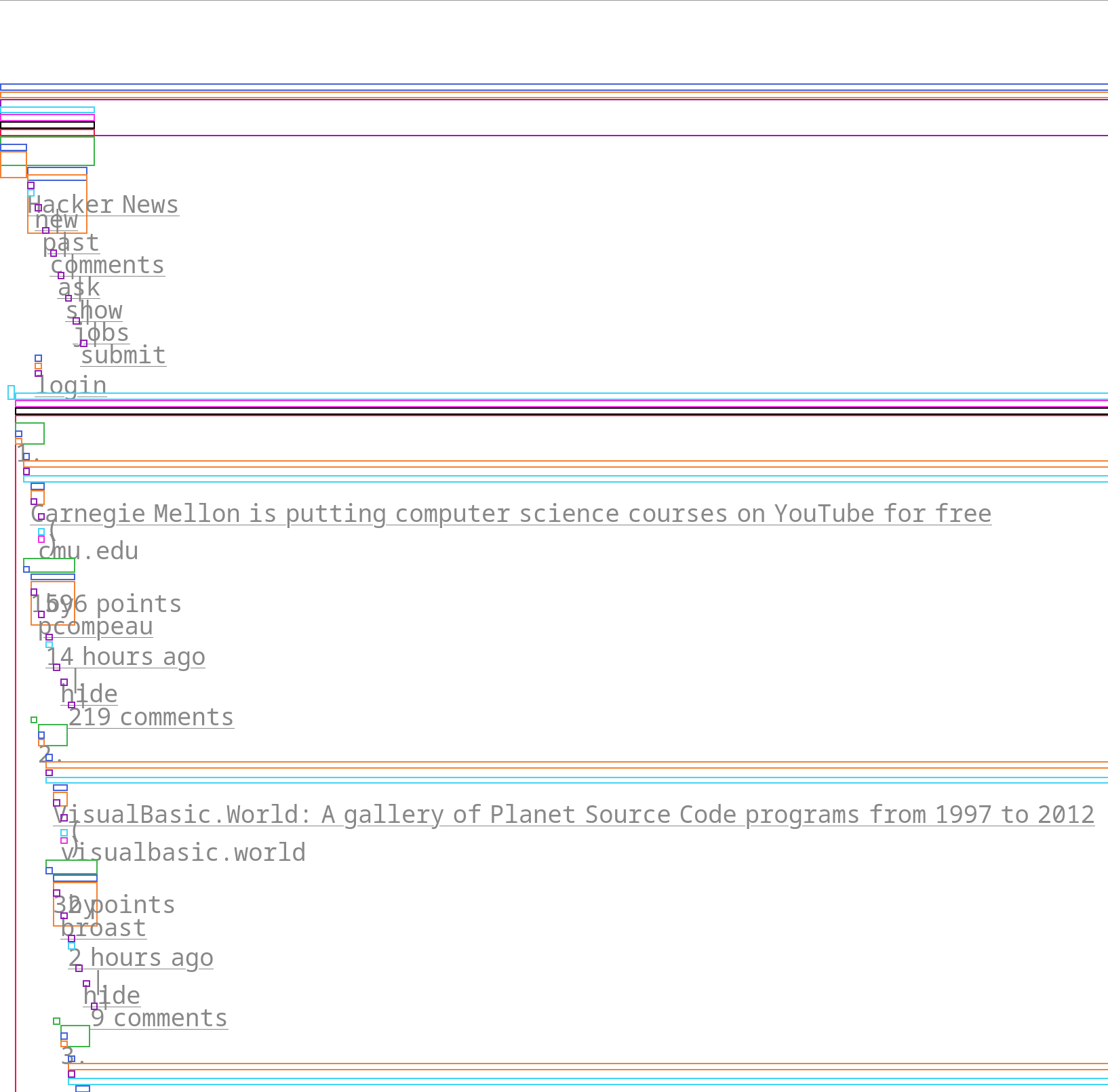
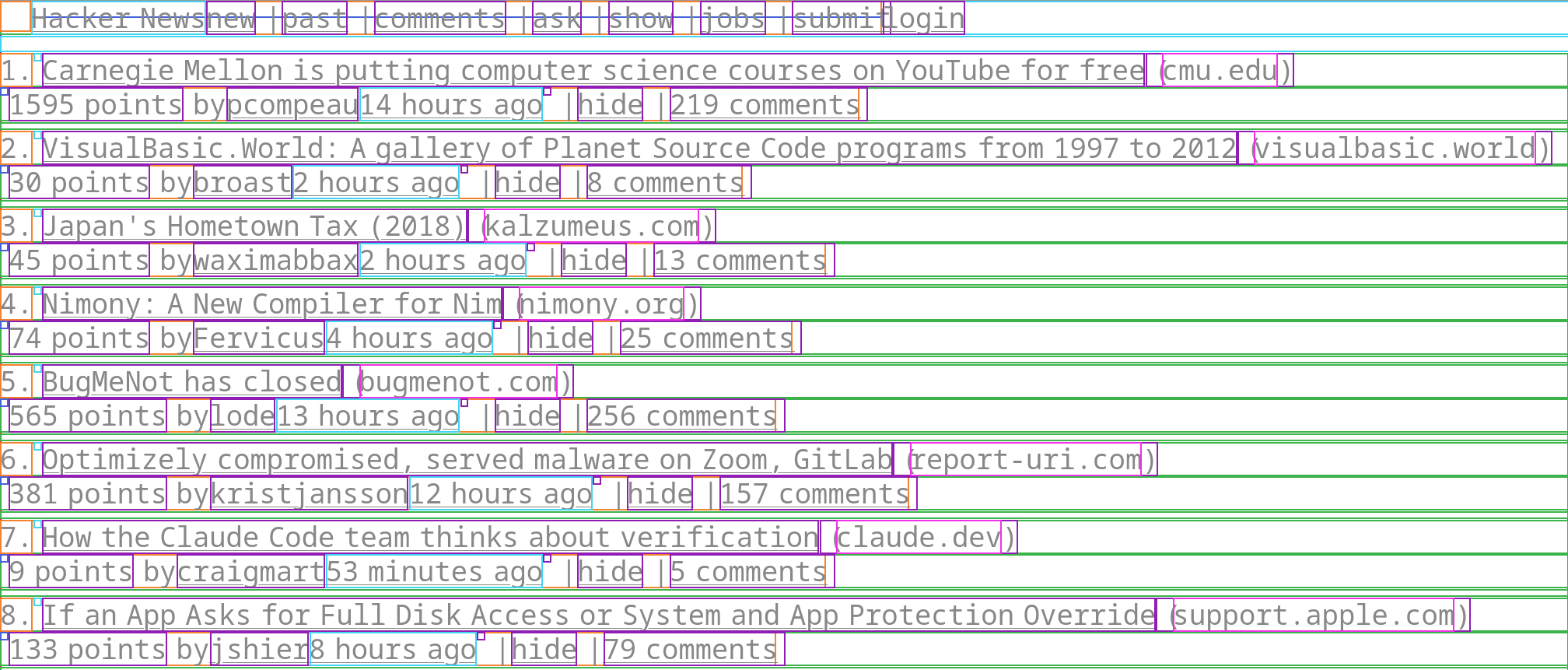
One way that we visualized this was to abuse the --wait-script-file parameter to walk through the DOM, give every node an absolute position based on its getBoundingClientRect and getComputedStyle (the APIs that return an element’s box and its final CSS values). (I say “abuse” because the parameter is intended to hold the page until the script returns truthy, but it works just as well for applying a final transformation to the DOM).
The “scripts/layout_boxes.js ” is in the repo and allows us to generate an HTML file that we can open in Firefox:
curl -O https://raw.githubusercontent.com/lightpanda-io/browser/1.0.5/scripts/layout_boxes.js
lightpanda fetch \
    --dump html \
    --strip-mode js --strip-mode ui \
    --wait-script-file layout_boxes.js \
    "https://news.ycombinator.com/" > hn.html
Running this on 1.0.3 and 1.0.5 makes the difference clear:
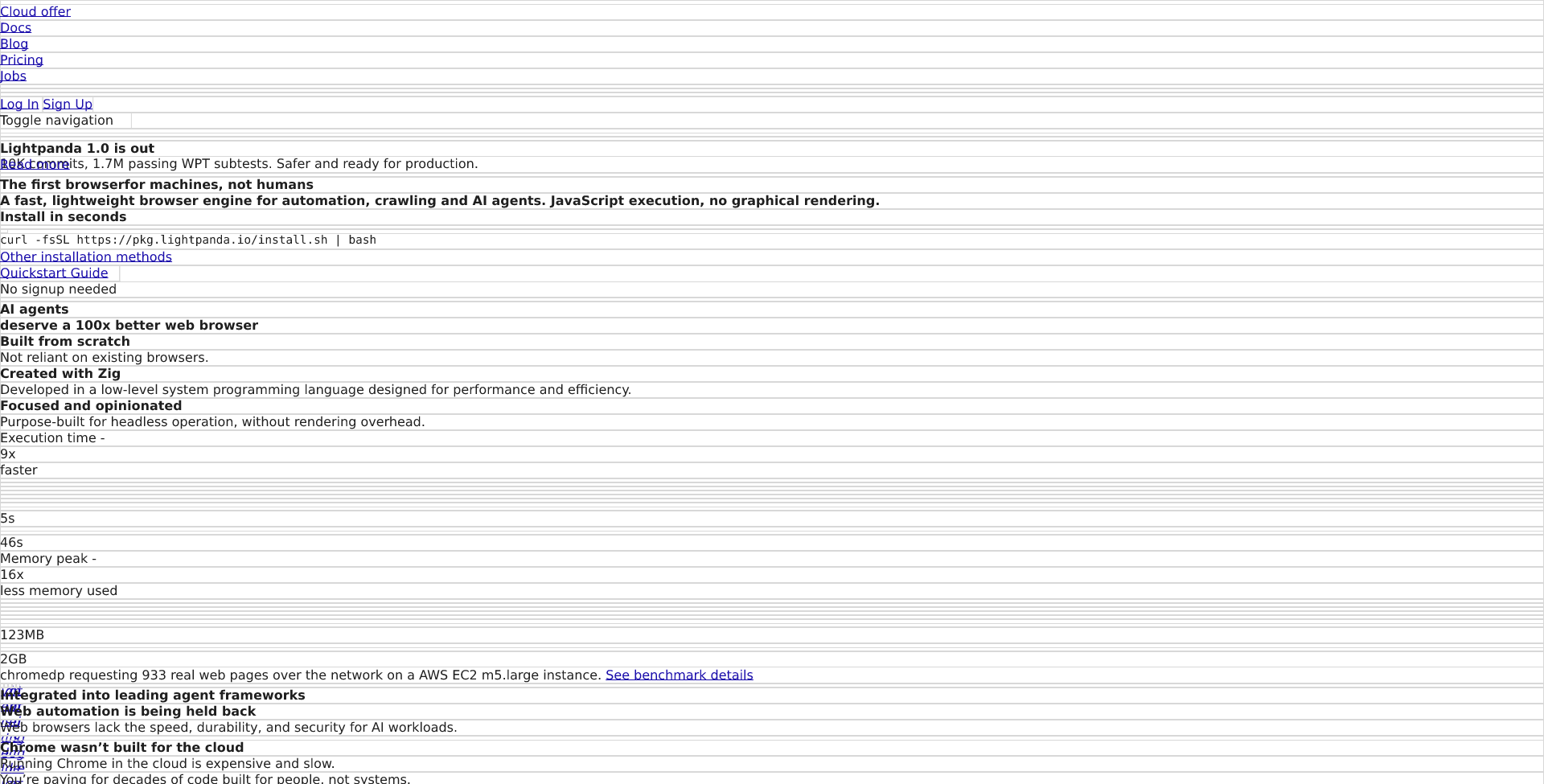
As a more complicated example, this is what the top of the https://lightpanda.io/ website looks like with an experimental screenshot creator using the new layout. It isn’t perfect or even pretty, but every box is where the size says it should be. Since 1.0.6, it ships as --dump png and CDP’s Page.captureScreenshot.
Faster layout
The initial implementation of the layout was up to 25x slower in some performance scenarios we track (synthetic cases meant to focus on a specific behavior, e.g. hit testing, but based on real world examples we’ve seen or contributed by users). We felt that, in general, we could make the new layout as fast as the old. After significant performance work, we managed to hit that target:
scenario    bin        instructions       Δ%  rss MB      Δ%
network     1.0.3             169.6   +0.00%    26.8   +0.0%
network     1.0.5             170.4   +0.47%    27.7   +3.1%
style       1.0.3             290.5   +0.00%    37.0   +0.0%
style       1.0.5             265.5   -8.62%    37.3   +0.8%
layout      1.0.3           12304.9   +0.00%    40.5   +0.0%
layout      1.0.5            1888.3  -84.65%    39.6   -2.1%
hittest     1.0.3            2210.6   +0.00%    36.6   +0.0%
hittest     1.0.5            2101.1   -4.95%    37.2   +1.7%
gbcr        1.0.3           12951.0   +0.00%    60.3   +0.0%
gbcr        1.0.5            1115.1  -91.39%    54.5   -9.6%
dom         1.0.3            1755.2   +0.00%    58.8   +0.0%
dom         1.0.5            1798.2   +2.45%    55.7   -5.3%
render      1.0.3             710.3   +0.00%    39.9   +0.0%
render 1.0.5 684.9 -3.57% 41.5 +4.2%- “instructions” is user-space CPU instructions, in millions; lower is better.
- “rss MB” is peak resident memory, in MiB; lower is better
- “gbcr” is getBoundingClientRect
- “render” simulates how some JavaScript frameworks build, change and read the DOM.
How? Two words: cache invalidation.
First, we knew that we’d need to store/cache more data, so we reduced memory usage in other places. Every Node became 8 bytes smaller, and every Element became 16 bytes smaller. We also reworked our allocation and lifetime strategy for every HTTP response which, on some sites, reduced memory by tens of megabytes, more than the new layout engine would ever need.
With that breathing room, the bulk of the optimization came in two parts: caching data and being selective about when cached values are invalidated. As a simple example, adding the bright class to an element can be a no-op if that bright class doesn’t change any layout-relevant styles. Now apply that same selective reset to various selector patterns. Then, add greater awareness about how styles change the layout. For example, when an element’s height changes, no element before it in the document moves, which means we can limit what to invalidate.
There were a number of less impactful optimizations. Some of the bytes removed from Element were used to store style-related information, avoiding element=>style lookups. We also targeted specific operations like elementFromPoint and getBoundingClientRect by adding higher-level helpers that could fetch all of an element’s properties needed for that specific operation in a single call. These were relatively small wins, but on tight loops, they added up.
There are synthetic cases where the new layout will struggle. And, the web being what it is, no doubt those cases do exist in the wild. Overall, we could claim that the new layout is faster, but we think it’ll have very little impact either way. The truth is that most sites don’t spend their time or memory here; they spend it running all types of JavaScript , of which, this is a tiny surface.
Conclusion
There’s still work to do. Padding and margin, which can turn a seemingly zero-sized element into something clickable, get a first pass in 1.0.6, with more to come. Our IntersectionObserver (the API that tells a page when an element scrolls into view) needs to be revisited with respect to the new layout capabilities and can hopefully become more accurate and reliable.
We still intend to lean into the benefits of not having to render a page for human consumption. It’s obviously simpler and there are clear performance advantages with more possible shortcuts. The goal of the layout isn’t to make it pretty or human-readable. The goal is to make it internally consistent and realistic in a way scripts depend on. What does Lightpanda see? It sees a box positioned relative to the height of its previous block siblings and its ancestors.
See what Lightpanda sees on your own pages
Install Lightpanda with the quickstart guide , run layout_boxes.js on the pages that give you trouble, then paste the same script into Chrome’s DevTools console on that page to compare the two layouts. For a quick image, run lightpanda fetch --dump png instead. If a box is far from where it should be, open an issue on GitHub with the URL.
FAQ
Does Lightpanda compute a page layout?
Yes. It gives every element a position and a size that scripts can read, but never turns them into pixels.
Do I need to change my scripts for the new layout?
No. The layout is always on. APIs that read positions and sizes, such as getBoundingClientRect, elementFromPoint or CDP’s DOM.getBoxModel, now return more realistic values.
What viewport size does Lightpanda use?
1920×1080 by default. Change it with Puppeteer’s page.setViewport() or Playwright’s viewport option; layout positions follow the new size.
Can Lightpanda take screenshots?
Yes. --dump png, CDP’s Page.captureScreenshot and WebDriver BiDi’s browsingContext.captureScreenshot draw each element as a box at the position and size the layout computed. Add --png-mode reader to get a single-column text view instead.
What doesn’t the layout handle yet?
Padding and margin only get a first pass in 1.0.6. Flex, grid, positioning and tables are partly supported, and IntersectionObserver still needs to be updated for the new layout.
Karl Seguin
Software Engineer
Karl is a software engineer, creator of popular open-source Zig libraries like http.zig or websocket.zig. Karl has been writing about programming for years on his blog openmymind.net and is the author of Learning Zig, a series of articles to help other developers pick up the language. At Lightpanda, he works on building the core browser engine.