PandaScript vs Puppeteer and Playwright

Adrià Arrufat
Software Engineer
TL;DR
A PandaScript is the script you would write for Puppeteer or Playwright, except it runs inside the Lightpanda binary instead of sending commands to a browser in another process. No setup required: lightpanda run script.js reads the file and does the browsing itself. The Puppeteer or Playwright version of the same script needs Node.js, an npm install, a Chrome download, and a running browser to connect to.
PandaScripts are very light on memory. PandaScript uses 4x less memory than Playwright on the news-monitoring task example. They are quick, too. A login flow finishes 14x faster than Puppeteer on Chrome, browser startup included. When run in parallel, a batch of Hacker News requests finishes 3x faster on roughly 30x less CPU and 40x less memory, because Chrome saturates the machine and Lightpanda barely touches it.
Lightpanda’s agent can also write the script for you from a prompt in plain English. Replaying a saved script is deterministic and needs no API key.
The script
PandaScript is a simple JavaScript file with a straightforward syntax. In this example, we open the Hacker News front page, take the top five stories, visit each comment page, and return the top three comments. Six page loads, one JSON result. Here’s what it looks like as a PandaScript:
const page = new Page();
await page.goto("https://news.ycombinator.com");
const { stories } = page.extract({
  stories: [{
    selector: "tr.athing",
    limit: 5,
    fields: {
      id: { selector: "", attr: "id" },
      title: ".titleline > a",
      url: { selector: ".titleline > a", attr: "href" }
    }
  }]
});

for (const story of stories) {
  await page.goto(`https://news.ycombinator.com/item?id=${story.id}`);
  story.comments = page.extract({
    comments: [{
      selector: "tr.comtr",
      limit: 3,
      fields: { user: ".hnuser", text: ".commtext" }
    }]
  }).comments;
}
return stories;
Two details worth noting. First, page.goto is awaited because it waits on the network, and page.extract is not, because it reads a DOM that is already in this process. Second, whatever the script returns is what comes back as JSON on stdout.
PandaScript is simpler than Puppeteer or Playwright, which both have to start a browser before they can do anything and tear it down afterward:
import puppeteer from 'puppeteer';
const browser = await puppeteer.launch();
const context = await browser.createBrowserContext();
const page = await context.newPage();
// the same navigate, select and loop as above
await page.close();
await context.close();
await browser.close();
The work in the middle is the same. The difference is at the edges: four lines to start a browser and open a page inside it, three to shut it down. A PandaScript starts working on line one, because the process that runs the script is the browser.
The other difference is how data comes out. Puppeteer and Playwright give you $$eval: you ship a function into the page and collect what it returns. PandaScript’s extract takes a declarative schema, selectors in and JSON out.
Schemas survive replay better than code. A selector either matches or it doesn’t, and when it doesn’t the error names the selector. With $$eval you get a stack frame from inside a function that was serialized into a page you can’t see.
Before either script runs, here is what the machine needs:
| Puppeteer / Playwright | PandaScript | |
|---|---|---|
| Runtime | Node.js | none |
| Dependencies | npm install, node_modules/ | none |
| Browser | Chromium download (~170 MB) or a running Chrome | none |
| Connection | Launch the browser, and connect over CDP | none |
| Total | Two processes and a protocol | One process |
Installing Lightpanda is one command: curl -fsSL https://pkg.lightpanda.io/install.sh | bash. After that, lightpanda run script.js.
Generate a PandaScript with the Lightpanda agent
You can write the script by hand, and for something this size that is a reasonable choice. You can also describe the task in plain English and let the lightpanda agent do it. The agent opens a REPL where every instruction runs against a live page, so you see what came back before it ever becomes a script. Writing the Hacker News example below cost $0.12 in API calls, once, with Gemini 3.8 Flash. Every replay after that is free.
$ lightpanda agent
❯ open news.ycombinator.com and get me the top 5 stories with their ids
// stories printed here
[agent: worked for 4.7s · 2 tool calls]

❯ for each of those, open the comment page and take the top 3 comments
// stories with comments printed here
[agent: worked for 49.5s · 10 tool calls]

❯ /save hn.js
[agent: worked for 3.4s · 0 tool calls]
Saved synthesized script to hn.js

❯ /usage
usage: input=148195 (fresh=140225 · cache read=7970 · cache write=0), output=3112
cache: 5% of input served from cache
The PandaScript above contains only the successful calls that retrieve the desired data. All of the agent’s unsuccessful attempts are excluded.
Credentials
If the task needs to log in, put the secret in an environment variable and refer to it by name. Here is the login script measured later in this post, in full:
const page = new Page();
await page.goto("$LP_BASE_URL/login");

page.fill("input[name=acct]", "$LP_HN_USERNAME");
page.fill("input[name=pw]", "$LP_HN_PASSWORD");
page.press("input[name=pw]", "Enter");

page.waitForState({ state: "load" });
page.waitForSelector("#logout");

await page.goto("$LP_BASE_URL/user?id=$LP_HN_USERNAME");
const { karma } = page.extract({
  karma: "#hnmain table table tr:nth-child(3) td:nth-child(2)"
});

return { karma: parseInt(karma, 10) };
Run it with the values in the environment:
LP_HN_USERNAME=panda LP_HN_PASSWORD=… lightpanda run login.js
Lightpanda resolves any $LP_* placeholder against its own environment the moment the call runs. The script carries the name and never the value, so it is safe to commit. Only LP_ prefixed names resolve, so the rest of your environment stays unreachable to the script.
PandaScript uses 4x less memory than Puppeteer and Playwright
We ran the same four tasks in four configurations: PandaScript, Puppeteer, Playwright, and browser-use CLI. Puppeteer and Playwright are the two most widely used web automation libraries. browser-use CLI is a more recent automation tool built for coding agents rather than a library humans write scripts against (similar to PandaScript).
Our tests ran on each tool, driving either Chrome or the Lightpanda engine (the same engine PandaScript runs on). Pairing every driver with both engines separates the engine from the way it is driven, so what is left is the cost of driving.
The tasks are Hacker News, a hydration-heavy storefront (eu.gymshark.com), an ad-heavy news page (apnews.com), and a login flow served from localhost that takes the network out of the comparison.
| Configuration | HN scrape | Retail (storefront) | News monitoring | Login (local) |
|---|---|---|---|---|
| PandaScript | 39 MB | 218 MB | 227 MB | 16 MB |
| Puppeteer → Lightpanda | 128 MB | 355 MB | 438 MB | 102 MB |
| Playwright → Lightpanda | 139 MB | 368 MB | 456 MB | 109 MB |
| Puppeteer → Chrome | 614 MB | 1,038 MB | 1,024 MB | 436 MB |
| Playwright → Chrome | 680 MB | 1,186 MB | 986 MB | 516 MB |
| browser-use CLI → Lightpanda | 98 MB | 341 MB | 365 MB | 90 MB |
| browser-use CLI → Chrome | 433 MB | 807 MB | 845 MB | 395 MB |
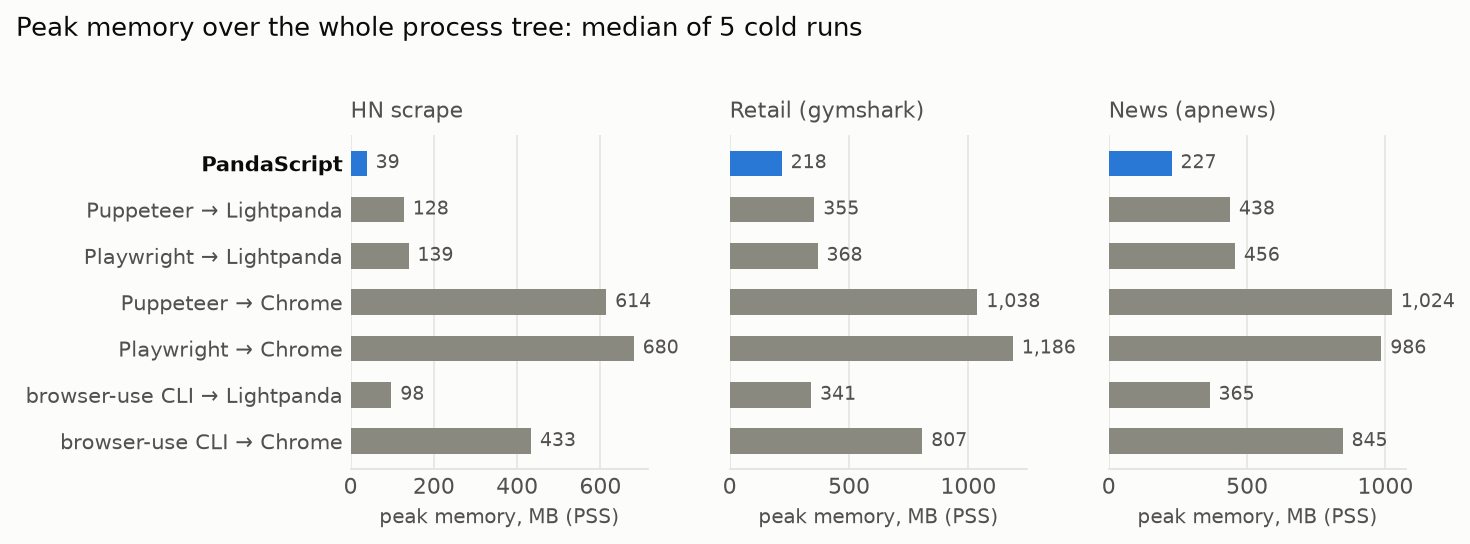
A PandaScript is lighter because it’s just one process that executes the tasks directly and natively on Lightpanda browser. Puppeteer, Playwright, and browser-use CLI control the browser using CDP (Chrome DevTools Protocol) in a separate process (Node.js or Python), requiring message serialization and deserialization over a WebSocket connection while keeping the browser running.
Part of the gap in memory also sits on the browser engine itself. Chrome is heavy. In the storefront example it uses 1 gigabyte of memory. The Lightpanda engine is much lighter, as shown in the numbers published above.
PandaScript is faster than Puppeteer and Playwright
Running one request at a time means that any engine will spend most of its time waiting on the network. For example, Hacker News takes a few hundred milliseconds to respond. However, a crawler or a monitoring job runs hundreds of requests in parallel. At that point what matters is how much of the machine’s resources each one of those requests costs.
PandaScript is significantly more efficient than Puppeteer and Chrome, completing parallel tasks 3x faster. The Lightpanda engine also outperforms Chrome, with a minimal increase in resource consumption as the workload scales.
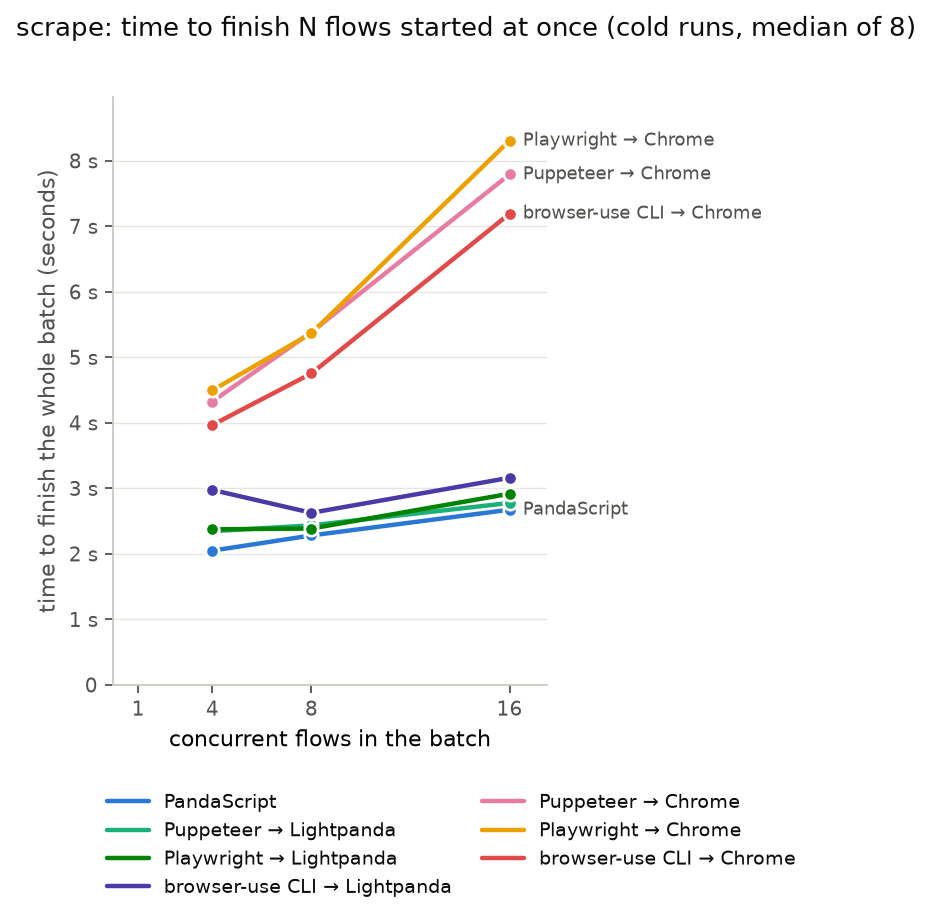
PandaScript is actually so fast that it needs pacing. In this benchmark we run 16 processes at the same time and send their first request within the same millisecond, and Hacker News’s burst limiter treats that as an attack. That’s why the PandaScript starts its processes 30 ms apart in our benchmark (which any worker pool should do anyway).
| driver | 4 flows | 8 flows | 16 flows | CPU at 16 | peak memory at 16 |
|---|---|---|---|---|---|
| PandaScript | 2.05 s | 2.28 s | 2.67 s | 2.1 s | 162 MB |
| Puppeteer → Lightpanda | 2.34 s | 2.43 s | 2.78 s | 12.0 s | 870 MB |
| Playwright → Lightpanda | 2.37 s | 2.39 s | 2.92 s | 14.4 s | 982 MB |
| browser-use CLI → Lightpanda | 2.97 s | 2.63 s | 3.16 s | 9.7 s | 966 MB |
| browser-use CLI → Chrome | 3.97 s | 4.75 s | 7.19 s | 43.4 s | 5.4 GB |
| Puppeteer → Chrome | 4.32 s | 5.38 s | 7.79 s | 57.0 s | 7.2 GB |
| Playwright → Chrome | 4.50 s | 5.37 s | 8.31 s | 65.0 s | 8.0 GB |
You can find the harness, scripts and raw per-run data in the benchmarks repo .
Try it on your own task
Installing and running it takes two lines:
curl -fsSL https://pkg.lightpanda.io/install.sh | bash
lightpanda run your-task.js
The PandaScript docs cover the primitives this post skipped: click, press, hover, selectOption, setChecked and the waitFor* methods, plus how extract schemas map to JSON. If you would rather describe the task than write it, lightpanda agent does that, and /save hands you the script.
Tell us how it went on Discord , or open an issue on GitHub .
FAQ
What is a PandaScript?
A plain JavaScript file with a small set of browser primitives (goto, extract, fill, click, …) built directly into Lightpanda. lightpanda run script.js executes it inside the browser process.
Do I need an LLM to run one?
No. You write a PandaScript and run it with lightpanda run, and no model is involved at any point. Optionally, lightpanda agent lets you work through the task in plain English and /save writes the session out as a script, and running that script is model-free too.
Why is PandaScript faster than CDP on the same browser engine?
Because nothing sits between the script and the engine. A click in a PandaScript is an in-process function call. From Puppeteer it is a serialized message over a WebSocket to another process, and the page data comes back the same way. On network-bound tasks that costs anywhere from under 10% to about 47% of wall time. On a network-free login flow it is 38 ms against 286 ms.
How much memory does a PandaScript save?
On the live tasks in this post, PandaScript is 1.2x to 2.3x faster than Puppeteer or Playwright driving Chrome and uses 4x to 17x less memory. The memory gap is the wider of the two because it comes from the shape of the setup rather than the speed of the code. A PandaScript is one process that does the task and exits. Driving a browser with Puppeteer or Playwright keeps a runtime and a browser alive for the whole run, and with Chrome that browser is a browser process, a GPU process, a network service, and a renderer for every page.
Does it work in CI and serverless?
Yes, and that is where the cold numbers matter most. There is no Node.js runtime to install on the CI image, so the container is one binary and a script file. In the example above PandaScript’s 227 MB peak memory also fits inside limits that Chrome plus a Node.js driver does not.
Is PandaScript replacing Puppeteer and Playwright support in Lightpanda?
No. lightpanda serve speaks CDP and existing Puppeteer and Playwright scripts run against it unchanged. It is how four of the seven configurations in this post were measured, and we are actively developing CDP support.
How is browser-use CLI different from PandaScript?
browser-use CLI lets you pipe a Python script into a daemon that runs it against a browser over CDP, with no LLM in the loop. PandaScript does the xsame thing one layer lower, inside the engine, which allows PandaScript to be up to 24x faster and use up to 11x less memory.
You can run browser-use CLI on the Lightpanda engine using lightpanda serve and benefit from a lighter browser engine. That is how the browser-use rows above in our benchmark were measured.
If you are already a Python user, the Python SDK can drive Lightpanda directly without any additional overhead.
Can I benchmark this myself?
Yes. The harness, scripts, and raw results are in the benchmarks repo .
Adrià Arrufat
Software Engineer
Adrià is an AI engineer at Lightpanda, where he works on making the browser more useful for AI workflows. Before Lightpanda, Adrià built machine learning systems and contributed to open-source projects across computer vision and systems programming.