How should we benchmark Lightpanda for AI agents?

Adrià Arrufat
Software Engineer
TL;DR
We ran four browser-MCP configurations through AssistantBench and GAIA Level 1,
holding the LLM brain constant (Claude Sonnet 4.6 in claude --print mode). The
setup lets you hold either variable constant: same engine, different MCP
surfaces, or same MCP surface, different engines. Two findings came out of it.
The tool surface the MCP server exposes to the model matters more than the browser engine underneath it. When the tool surface is held constant, Lightpanda is the better engine: faster, cheaper, fewer timeouts. agent-browser wrapping Lightpanda outperforms our own MCP, because we haven’t yet built around that finding. An upgrade for that is coming soon.
Why most browser benchmarks don’t fit Lightpanda
Lightpanda has no graphical rendering. That’s the design choice the whole project is built around, and it makes most existing browser benchmarks a poor fit for us. Screenshot-graded benchmarks like WebVoyager and Online-Mind2Web score agents on what they see on screen. We don’t render to a screen, so we’re not going to argue our way past that.
We picked benchmarks that match what Lightpanda actually does. Text-grounded, multi-step research tasks where success is measured deterministically against a known answer. AssistantBench and GAIA Level 1 both fit. Both grade with text-based comparators against published gold answers. Both reward reasoning across multiple sources, and neither requires the agent to inspect rendered pixels.
What we ran
We compared four backends, all driven by the same Claude Sonnet 4.6 instance through the MCP interface:
- Lightpanda MCP. Lightpanda’s own
lightpanda mcpserver on the main branch, 24 tools includinggoto,markdown,semantic_tree,evaluate. - agent-browser + Chrome. The agent-browser MCP server driving headless Chromium, 13 tools including
open,snapshot,find,get. - agent-browser + Lightpanda. Same agent-browser MCP server, but with
AGENT_BROWSER_ENGINE=lightpandaso Lightpanda is the underlying engine instead of Chrome. - browser-use + Chrome. The browser-use MCP server driving Chromium, 11 tools.
The benchmarks both grade against gold answers with string comparators. Both have a per-task timeout of 1800 seconds. We ran each backend once across the full suite at concurrency 4. Per-turn token usage was captured live off the Claude stream, so cost and context growth are measured rather than estimated.
Caveats up front
A few things to flag before the numbers, because they shape how much weight to put on small differences:
- Single run per configuration, no error bars. API non-determinism, open-web volatility (pages going down, search engines throttling), and small sample sizes (33 AB tasks, 53 GAIA tasks) put the noise floor on accuracy gaps at roughly ±10 pp. We treat differences ≥10 pp as meaningful and smaller gaps as directional.
- Text-heavy research workloads only. AssistantBench and GAIA Level 1 are Wikipedia lookups, store directories, news articles, and government data. Exactly the workloads where Lightpanda’s text-only design plays to its strengths. We didn’t test JS-heavy SPAs, CAPTCHA or Cloudflare challenges, or anything that needs actual rendering. “Browser fidelity for arbitrary modern web apps” is not what we measured.
- One model. Sonnet 4.6 is one point on the model-size axis. Larger models might handle Lightpanda MCP’s verbose tool outputs better. Smaller ones might struggle more.
- GAIA Level 1 only. Levels 2 and 3 would stress multi-hop reasoning more, where tool-surface quality probably matters even more than what we observed here.
This is a first honest pass at understanding the relationship between MCP design, browser engine, and agent accuracy.
The results
| Lightpanda MCP | agent-browser + Chrome | agent-browser + Lightpanda | browser-use | |
|---|---|---|---|---|
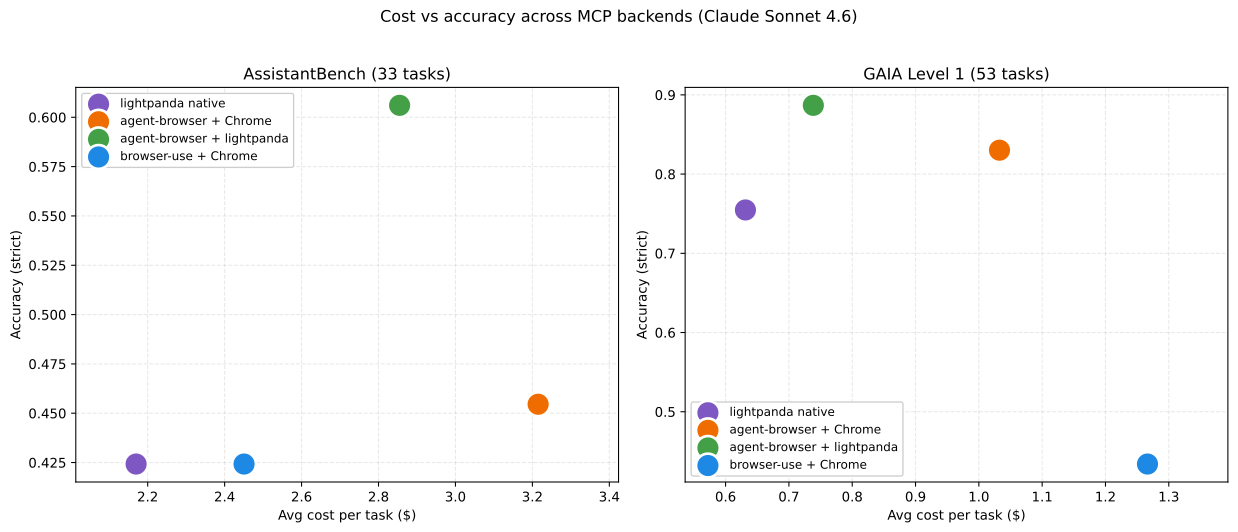
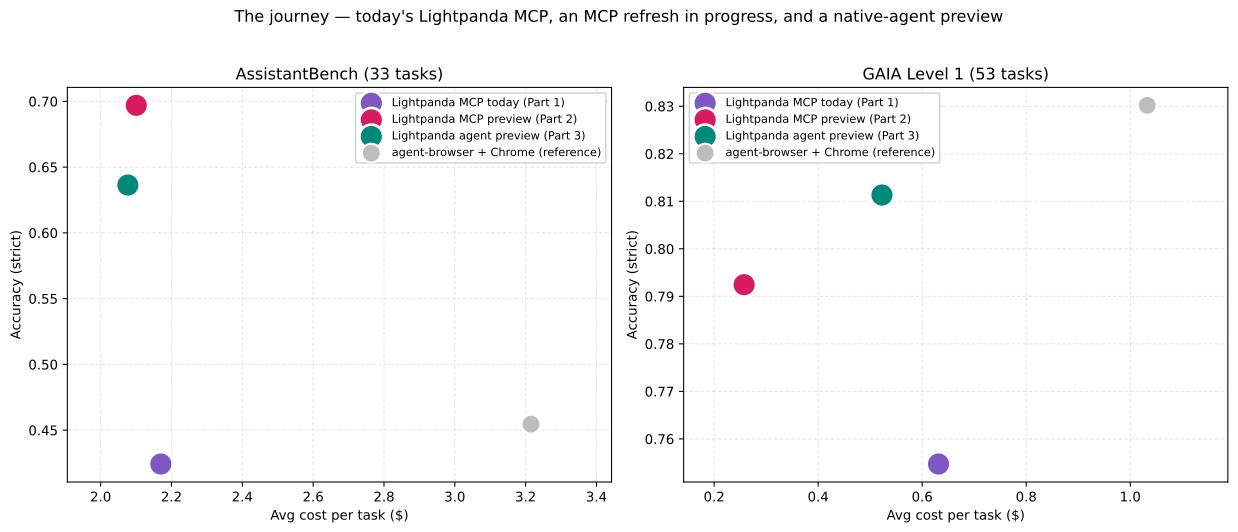
| AssistantBench (33) strict | 0.424 | 0.45 | 0.606 | 0.42 |
| AB avg duration | 1112 s | 1045 s | 956 s | 1130 s |
| AB timeouts | 11/33 | 8/33 | 7/33 | 4/33 |
| AB cost / task | $2.17 | $3.10 | $2.85 | $3.85 |
| GAIA Level 1 (53) strict | 0.755 | 0.83 | 0.887 | 0.43 |
| GAIA avg duration | 416 s | 453 s | 321 s | 287 s |
| GAIA timeouts | 6/53 | 4/53 | 1/53 | 2/53 |
| GAIA cost / task | $0.63 | $0.94 | $0.94 | $0.73 |
Three things stand out:
- agent-browser + Lightpanda is the Pareto winner on both benchmarks. It wins accuracy outright on both, and it’s roughly tied with the cheapest configuration on cost per task on GAIA.
- Lightpanda’s own MCP is the cheapest per task. $2.17 on AB, $0.63 on GAIA. But it’s also the slowest per task and has the most timeouts on AB (11 of 33). On accuracy, our MCP is behind agent-browser + Lightpanda by 18 pp on AssistantBench and 13 pp on GAIA.
- browser-use answers the most AssistantBench tasks (29 of 33) but matches Lightpanda MCP on accuracy at 0.42, and collapses on GAIA at 0.43. The model spends 55% of its calls on navigate, runs the longest turn counts (219 on AB, 152 on GAIA), and produces confident answers that aren’t grounded in careful page reading. On GAIA’s exact-match grader, “close enough” doesn’t score.
Tool surface beats engine
The interesting comparison holds either variable constant. Two configurations share an engine (Lightpanda) but use different MCP surfaces. Two configurations share a surface (agent-browser) but use different engines. Holding either variable constant tells you which one carries the weight.
| Lightpanda engine | Chrome engine | |
|---|---|---|
| Lightpanda MCP surface | AB 0.424 / GAIA 0.755 | not measurable (Lightpanda MCP is built into the Lightpanda binary, it can’t drive Chrome) |
| agent-browser MCP surface | AB 0.606 / GAIA 0.887 | AB 0.45 / GAIA 0.83 |
Same engine, different MCP surface: +18 pp on AB, +13 pp on GAIA.
Same MCP surface, different engine: +16 pp on AB, +6 pp on GAIA.
The MCP tool surface is the dominant variable. The engine is secondary, but consistently favours Lightpanda.
Why our MCP currently loses
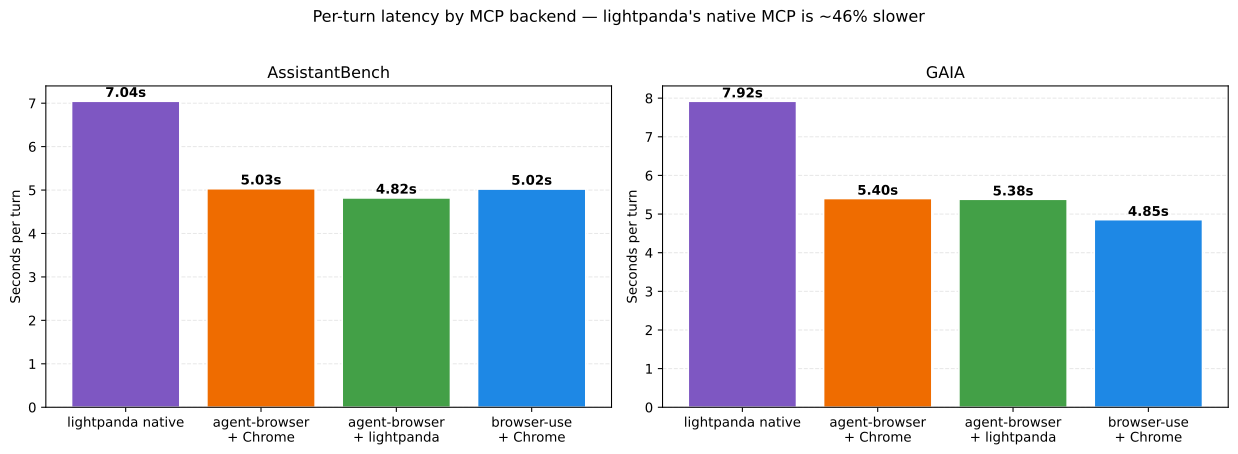
Lightpanda’s engine is fast. When wrapped by agent-browser’s MCP, it runs at 4.82 seconds per turn on AssistantBench, faster than Chrome+agent-browser at 5.03 seconds. It’s Lightpanda’s own MCP that’s slow, at 7.04 seconds per turn. About 46% more time per turn on the same engine, driven through a different MCP. Same pattern on GAIA (7.92 s vs 5.38 s).
A turn is “Claude emits a tool call, the MCP server runs it, returns a payload,
Claude reads it and emits the next tool call.” Bigger payloads mean more
serialization, more bytes over stdio, and more tokens for Claude to process.
And our MCP leans hard on one specific tool that returns large payloads:
markdown.
markdown returns the readable text of a page or subtree. On a real research
page that’s commonly 10 to 30 KB of text. On Lightpanda MCP, 34% of all tool
calls are markdown. On agent-browser variants, it’s effectively 0% because
agent-browser doesn’t have a markdown tool at all. browser-use sits at 18%.
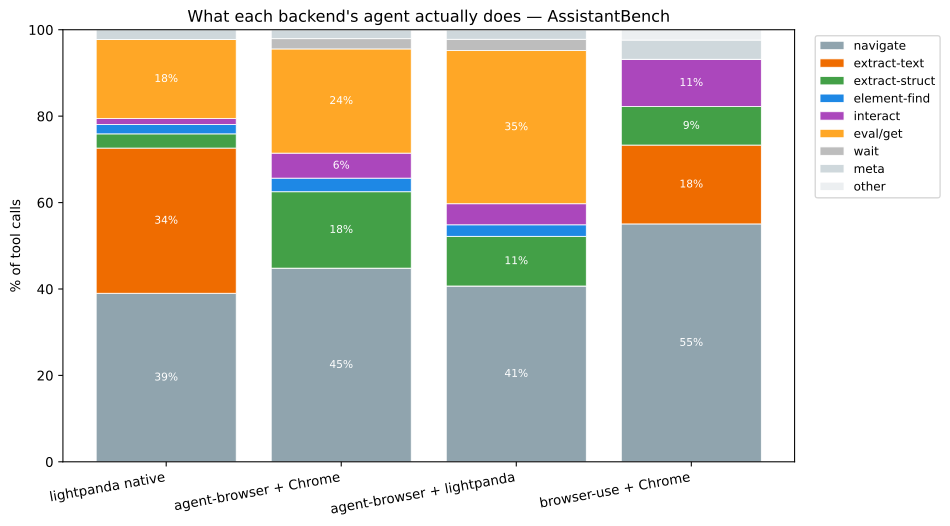
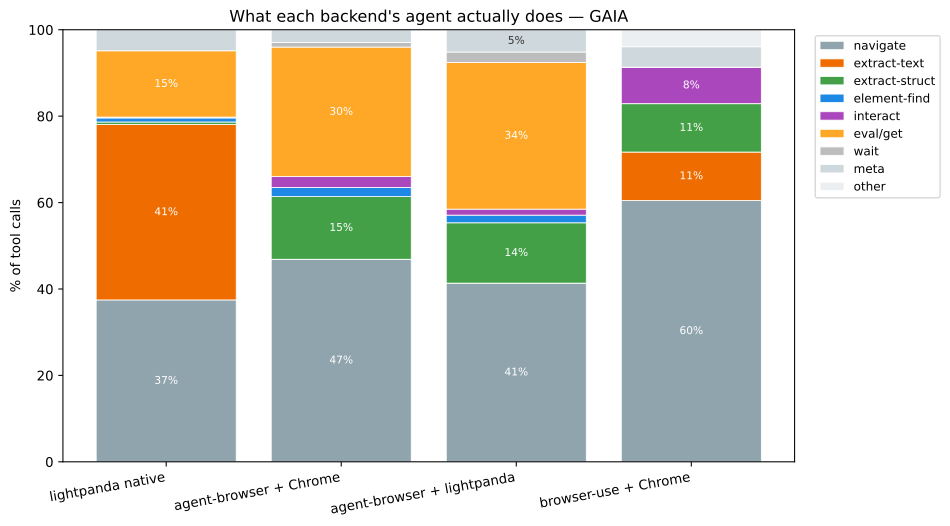
agent-browser’s design replaces full-page markdown with a combination of
snapshot (accessibility tree, structured and small), get (focused data
fetches), and find (locate by role). Smaller payloads per call, more calls,
lower total bytes flowing through Claude’s context per useful piece of
information. On AssistantBench:
| Lightpanda MCP | agent-browser + Lightpanda | |
|---|---|---|
| avg turns per task | 158 | 198 |
| avg tokens / turn | ~860 | ~660 |
| avg final-turn context | 136 K | 130 K |
| avg duration per turn | 7.04 s | 4.82 s |
agent-browser uses more turns, but each turn is smaller and faster. The agent gets more bites at the apple before the 30-minute clock runs out. On AB, where 11 of 33 Lightpanda MCP runs timed out vs 7 of 33 for agent-browser + Lightpanda, those extra bites translate directly into answered tasks.
Where our engine clearly wins
Hold the MCP surface constant and the engine comparison is cleaner. Same agent-browser tools, Chrome vs Lightpanda:
| agent-browser + Chrome | agent-browser + Lightpanda | |
|---|---|---|
| AB avg duration | 1045 s | 956 s |
| AB timeouts | 8/33 | 7/33 |
| GAIA avg duration | 453 s | 321 s |
| GAIA timeouts | 4/53 | 1/53 |
On GAIA, the Lightpanda engine cuts wall time per task by 29% and quarters the timeout rate. There are three concrete drivers behind this, none of them magic.
Lightpanda has more answered tasks. On AssistantBench, three of the five tasks where Lightpanda beat Chrome were tasks Chrome timed out on. On GAIA, two of five. There were zero cases on either benchmark where Lightpanda timed out but Chrome answered. The engine swap catches what Chrome runs out of time on without trading away any wins.
Lightpanda is faster per task even before any timeout shows up. Among tasks both engines completed within budget, Lightpanda was 9% faster on AB (656 s vs 718 s) and 20% faster on GAIA (274 s vs 343 s). That extra wall-time budget compounds, more retry attempts before the cap hits.
The page state stays where the agent left it. Same MCP server, but the agent makes meaningfully fewer “redo” calls on Lightpanda. On GAIA, Chrome agents call open (navigation) 70% more often (24.7 vs 14.5 per task) because pages drift out from under them: cookie banners, lazy-load reflows, post-load redirects. On AssistantBench, Chrome calls snapshot 54% more often (22.8 vs 14.8) because DOM mutations from ads and tracking JS invalidate prior snapshots, forcing re-reads.
Lightpanda is text-only, so the DOM the model sees stays stable across turns, and fewer retries are needed.
What we’re shipping next
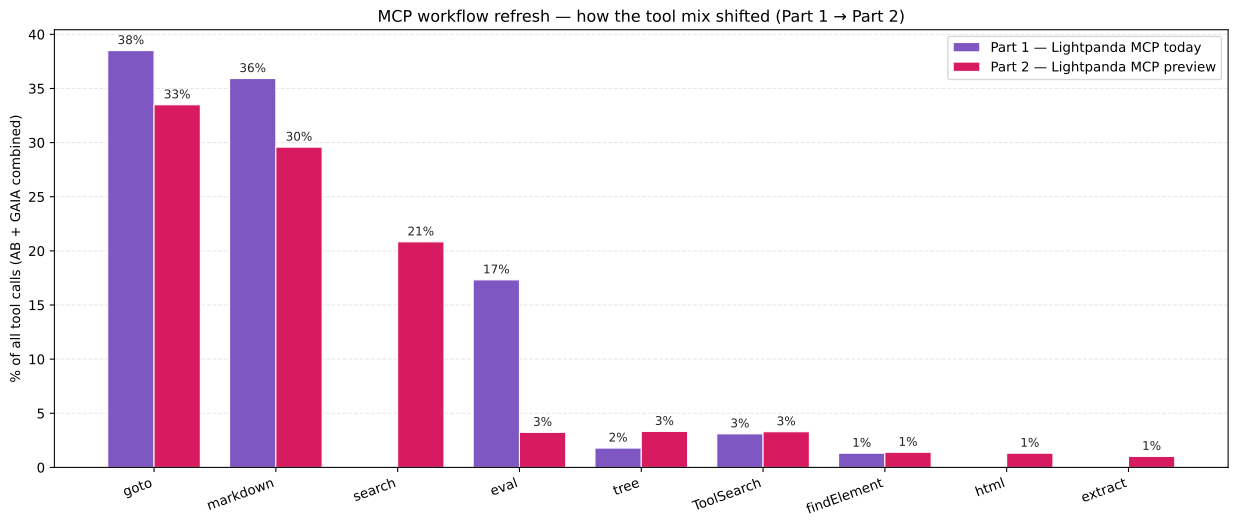
This data is driving three changes which we’re currently developing and testing.
- Workflow guidance, not tool count. Lightpanda’s MCP exposes 24 tools. agent-browser exposes 13 and outperforms it. The 34%
markdowndominance is the model reaching for the obvious “see what’s on the page” because nothing in our guidance pushes it elsewhere. The fix is workflow: start withtree(semantic overview, cheap) on any unfamiliar page, drill down withnodeDetailsorfindElementto locate the interesting region, then callmarkdown(backendNodeId | selector)to materialize prose for just that subtree. Full-page markdown stays available but is explicitly the fallback. - A first-class
searchtool. The model used to synthesise web searches bygoto-ing a search engine, callingmarkdownon the results page, and parsing manually. A dedicated search tool collapses that whole sequence into a single call. On our internal runs this also dropsevalfrom 17% of calls to 3%, because most of those JavaScript-evaluation calls were workarounds for thingssearchnow covers directly. The preview wraps Tavily search API as the primary backend, with DuckDuckGo as a fallback. A dedicatedsearchcall is cleaner than the goto+markdown pattern either way, but a hosted search API contributes to the preview’s speed. - An integrated agent inside Lightpanda that talks to the model directly. MCP is a great interop layer, but it adds round-trip overhead on every tool call, and the model has to repeatedly re-read large prefixes (system prompt, tool definitions, prior tool results) at full input price. We’re developing an agent that owns the conversation, and uses prompt caching on the system prompt and tool definitions. On Anthropic’s published pricing, cached input tokens are roughly 10x cheaper than fresh ones. Early internal runs put 99% of input tokens into cache reads after the first turn.
Try it yourself
Benchmarks, gold answers, harness, and per-task traces are at github.com/lightpanda-io/agent-benchmarks under Apache 2.0. The fastest way to reproduce the table is to clone the repo, open Claude Code in it, and ask it to reproduce the results with the same models and timeouts. That’s the whole workflow.
The quickstart guide gets you running Lightpanda locally in under 10 minutes if you want to try it on your own workloads first.
FAQ
Why didn’t you use WebVoyager?
WebVoyager grades agents on screenshots, and Lightpanda doesn’t render to a screen. There’s no fair way to run a non-rendering browser through a benchmark that scores visual matches. We focused on text-graded benchmarks where the comparison is meaningful.
Why does Lightpanda’s own MCP underperform agent-browser wrapping Lightpanda?
The tool mix leans heavily on markdown, which returns 10 to 30 KB of page text
per call. That inflates per-turn latency by about 46% compared to the same
engine wrapped by agent-browser, where smaller payloads (snapshot, get, find)
dominate. Our system-level workflow guidance points the model at full-page
markdown as the default page-inspection step, where agent-browser implicitly
steers it toward a tree-first pattern.
What model did you use?
Claude Sonnet 4.6 across every configuration. Driven through claude --print --output-format stream-json so per-turn cost and token usage came live off the
stream. The model is held constant so the variable is the browser layer.
Is the benchmark harness open source?
Yes. The runner, prompt configurations, gold answers, and per-task traces are at github.com/lightpanda-io/agent-benchmarks under Apache 2.0.
What’s the difference between agent-browser and browser-use?
agent-browser exposes a CDP-style tool surface: open, snapshot, find, get.
Pages come back as accessibility-tree snapshots with element IDs. browser-use
exposes a raw-HTML surface with browser_get_htmlreturning the full page
source, plus its own autonomous agent loop that we disabled for this
comparison. agent-browser leans on small structured payloads. browser-use leans
on full-page text and trusts the model to find what it needs.
How many runs did you average?
One per configuration. The headline differences are well above the ~10 pp noise floor we’d expect from API non-determinism and open-web drift. We treat differences ≥10 pp as meaningful and smaller ones as directional.
Did the agent know which browser it was using?
Not deliberately. The agent was told what tools it had access to and how to use them. It wasn’t told whether the browser underneath was Lightpanda or Chrome. We can’t fully rule out that something like a user-agent string leaked through on a given page, but nothing in our prompt or tool descriptions identified the engine.
Adrià Arrufat
Software Engineer
Adrià is an AI engineer at Lightpanda, where he works on making the browser more useful for AI workflows. Before Lightpanda, Adrià built machine learning systems and contributed to open-source projects across computer vision and systems programming.