Why Request Interception Matters

Pierre Tachoire
Cofounder & CTO
TL;DR
Request interception lets clients pause HTTP requests before they’re sent, modify them, or replace responses entirely. The real challenge isn’t the concept, it’s managing request ordering with asynchronous CDP message exchanges. You’re building a state machine that coordinates between your HTTP client and CDP WebSocket, ensuring requests don’t hang and race conditions don’t corrupt page state.
Why Request Interception Matters
When you’re automating the web at scale, you need control over network traffic. Here’s what users actually do with request interception:
- Proxy authentication. Many automation setups route traffic through proxies that require auth headers.
- Response caching. If you’re crawling thousands of pages from the same site, you don’t want to download the same JavaScript bundle thousands of times. Intercept the request, check your cache, return the cached response.
- Request blocking. Block analytics scripts (Google Analytics, Segment, Mixpanel), ad networks (DoubleClick, Facebook Pixel), or tracking pixels.
- Response mocking. For testing, inject specific API responses without hitting the real backend. Mock authentication endpoints to test logged-in states, inject error responses to test error handling, or simulate slow responses to test timeout behavior.
- Logging and debugging. See exactly what requests your page makes, in what order, with what headers. Detect unexpected third-party calls, or debug why a specific API request is failing.
This is one of the most-used features in tools like Puppeteer and Playwright. If you’re building a browser for automation, you need to get this right.
How CDP Request Interception Works
Chrome DevTools Protocol (CDP) is how clients control headless browsers. It’s the standard that Puppeteer, Playwright, and most automation tools speak. For request interception, the flow looks like this:
- Client sends
Fetch.enableto turn on interception - Before each request, browser sends
Fetch.requestPausedevent with a unique request ID - Browser waits for client to respond
- Client decides: continue, modify, fail, or fulfill the request
- Client sends the appropriate command (
Fetch.continueRequest,Fetch.failRequest, orFetch.fulfillRequest) - Browser proceeds accordingly
Here’s what this looks like from the client side in Puppeteer:
await page.setRequestInterception(true);

page.on('request', request => {
  if (request.url().endsWith('.json')) {
    // Inject a fake response
    request.respond({
      status: 200,
      contentType: 'application/json',
      body: JSON.stringify({ mocked: true })
    });
  } else if (request.url().includes('analytics')) {
    // Block analytics
    request.abort();
  } else {
    // Let it through
    request.continue();
  }
});
Simple API. But underneath, there’s important coordination happening between the browser and client over WebSocket.
The Implementation Challenge
The naive approach doesn’t work. You can’t just pause your HTTP client and block until the WebSocket message comes back. That would block your entire event loop.
Here’s what we actually built:
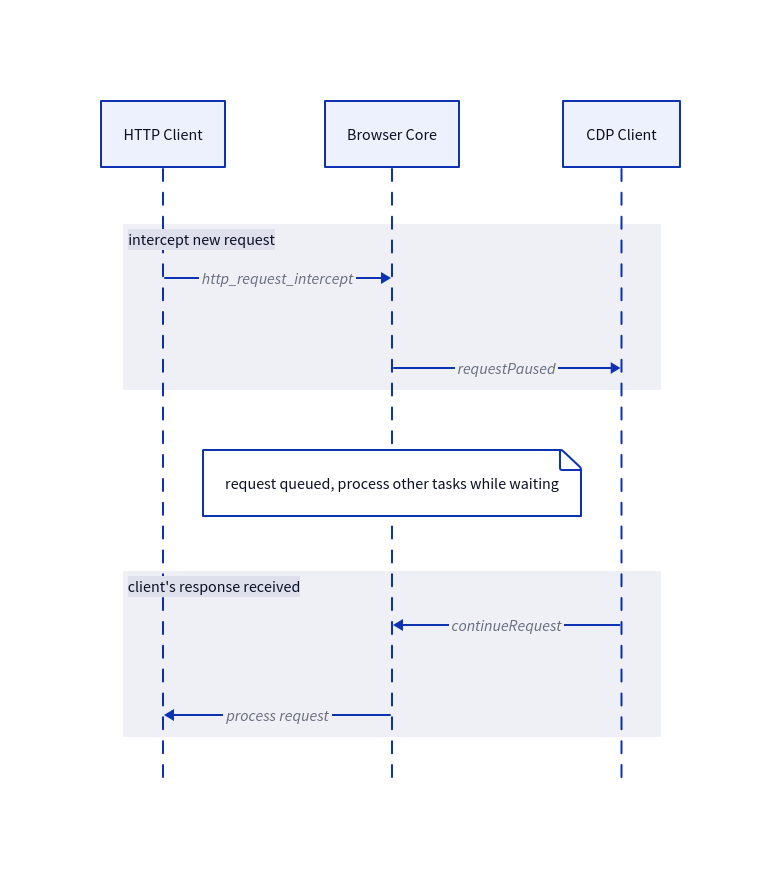
The key insight is that you need an async queue. When a request comes in:
- Register a callback with the HTTP client.
- On new request, the HTTP Client dispatches an internal
http_request_interceptevent to eventually wait for interception.
var wait_for_interception = false;
transfer.req.notification.dispatch(.http_request_intercept, &.{
    .transfer = transfer,
    .wait_for_interception = &wait_for_interception,
});
if (wait_for_interception == false) {
    // request not intercepted, process it normally
    return self.process(transfer);
}

self.intercepted += 1;
if (comptime IS_DEBUG) {
    log.debug(.http, "wait for interception", .{ .intercepted = self.intercepted });
}
transfer._intercept_state = .pending;

if (req.blocking == false) {
    // The request was intercepted, but it isn't a blocking request, so we
    // don't need to block this call. The request will be unblocked
    // asynchronously via either continueTransfer or abortTransfer
    return;
}

if (try self.waitForInterceptedResponse(transfer)) {
    return self.process(transfer);
}- requestIntercept puts the request info in a pending queue.
- It sends a
requestPausedmessage to the CDP client.
const transfer = intercept.transfer;
try bc.intercept_state.put(transfer);

try bc.cdp.sendEvent("Fetch.requestPaused", .{
    .requestId = try std.fmt.allocPrint(arena, "INTERCEPT-{d}", .{transfer.id}),
    .request = network.TransferAsRequestWriter.init(transfer),
    .frameId = target_id,
    .resourceType = switch (transfer.req.resource_type) {
        .script => "Script",
        .xhr => "XHR",
        .document => "Document",
        .fetch => "Fetch",
    },
    .networkId = try std.fmt.allocPrint(arena, "REQ-{d}", .{transfer.id}),
}, .{ .session_id = session_id });

log.debug(.cdp, "request intercept", .{
    .state = "paused",
    .id = transfer.id,
    .url = transfer.url,
});
// Await either continueRequest, failRequest or fulfillRequest

intercept.wait_for_interception.* = true;- Return control to the event loop.
- When the client responds , look up the request by ID.
- Execute the appropriate action: update and process, fulfill or abort the request.
const arena = transfer.arena.allocator();
// Update the request with the new parameters
if (params.url) |url| {
    try transfer.updateURL(try arena.dupeZ(u8, url));
}
if (params.method) |method| {
    transfer.req.method = std.meta.stringToEnum(Http.Method, method) orelse return error.InvalidParams;
}

if (params.headers) |headers| {
    // Not obvious, but cmd.arena is safe here, since the headers will get
    // duped by libcurl. transfer.arena is more obvious/safe, but cmd.arena
    // is more efficient (it's re-used)
    try transfer.replaceRequestHeaders(cmd.arena, headers);
}

if (params.postData) |b| {
    const decoder = std.base64.standard.Decoder;
    const body = try arena.alloc(u8, try decoder.calcSizeForSlice(b));
    try decoder.decode(body, b);
    transfer.req.body = body;
}

try bc.cdp.browser.http_client.continueTransfer(transfer);
The tricky part is making sure nothing leaks. If a client disconnects while requests are pending, you need to clean up. If a page navigates away, pending requests for that page need to be aborted. If the same request ID is somehow reused (it shouldn’t be, but you must do defensive programming), you need to handle it carefully.
We use a counter in our HTTP client to track the pending intercepted requests. Then we use it to detect network idle events.
const http_active = http_client.active;
const total_network_activity = http_active + http_client.intercepted;
if (self._notified_network_almost_idle.check(total_network_activity <= 2)) {
    self.notifyNetworkAlmostIdle();
}
if (self._notified_network_idle.check(total_network_activity == 0)) {
    self.notifyNetworkIdle();
}
At CDP level, we store all pending requests in a hashmap. We can then abort these requests on client disconnection .
// abort all intercepted requests before closing the sesion/page
// since some of these might callback into the page/scriptmanager
for (self.intercept_state.pendingTransfers()) |transfer| {
    transfer.abort(error.ClientDisconnect);
}
Performance Considerations
Request interception adds latency. Every intercepted request requires a round-trip to the CDP client before it can proceed.
If you’re doing heavy interception, the latency is often acceptable because you’re saving more time than you’re spending. Blocking 50 analytics and ad requests that would each take 100ms is potentially worth the few milliseconds of interception overhead.
Try Lightpanda
If you want to try Lightpanda, the quickstart guide will get you running in a few minutes. We welcome feedback and issues. We respond to all emails and would love to hear about your use cases.
Pierre Tachoire
Cofounder & CTO
Pierre has more than twenty years of software engineering experience, including many years spent dealing with browser quirks, fingerprinting, and scraping performance. He led engineering at BlueBoard with Francis and saw the same issues first hand when building automation on top of traditional browsers. He also runs Clermont'ech, a community where local engineers share ideas and projects.